
Sciences comportementales
Un petit nombre de signalements de phishing peut cacher un cyberrisque
L’efficacité d’une formation de sensibilisation à la cybersécurité est souvent mesurée par les comportements des utilisateurs. La plupart des équipes se focalisent avant tout sur le taux de clic, le taux de signalement et le taux d’achèvement de la formation. Ces chiffres sont utiles, mais ils ne reflètent que ce que les collaborateurs font de manière active.
Ceux qui n’envoient jamais de signalements sont plus difficiles à évaluer. Il se peut qu’ils n’aient pas trouvé l’e-mail suspect et aient donc décidé de ne rien faire. Ou qu’ils aient hésité à le signaler, ne sachant pas trop si c’était pertinent. Ou encore qu’ils aient considéré que ce message n’avait rien à voir avec leur travail.
Il faut plus qu’un utilisateur ayant repéré qu’un e-mail était suspect pour obtenir un signalement. Une étude de 2024 sur le comportement d’intervention en matière de phishing a révélé que les collaborateurs pouvaient se décourager s’ils avaient l’impression que leurs signalements avaient peu d’intérêt, s’ils ne recevaient aucun feedback ou retour, ou encore s’ils étaient préoccupés par des questions de confidentialité ou d’autres sujets.
Le guide Passez à la Défense Adaptative de SoSafe met en évidence un problème similaire dans la culture de la sécurité. Dans l’enquête qu’il cite, 42 % des professionnels de la sécurité ont déclaré que, dans leur entreprise, les signalements d’erreurs ou de quasi-incidents était limité ou que les gens semblaient éviter d’en envoyer. Parmi eux, 23 % estiment que les collaborateurs signalent peu les tentatives de phishing par peur des conséquences, et 19 % déclarent que les collaborateurs envoient rarement des signalements, voire évitent complètement de le faire.
Lors du webinaire SoSafe Live | In Action: Adapting to Threats, une question du public a porté sur la « population silencieuse », c’est-à-dire justement sur ces collaborateurs qui ne cliquent pas, n’envoient pas de signalement ou ne répondent pas pendant les simulations. Nous sommes en train d’étudier ce point chez SoSafe en vue de proposer, à l’avenir, de nouvelles fonctionnalités sur nos produits. Mais pour les équipes de sécurité, la question soulève un problème des plus urgents. Que signifie réellement le silence de ces collaborateurs qui n’envoient aucun signalement face à des e-mails suspects ?
Dans cet article, vous découvrirez comment analyser plus précisément un contexte où les signalements de phishing sont rares, identifier les points qui peuvent faire hésiter les collaborateurs et favoriser l’envoi de signalements qui facilitent le passage à l’action sans faire peser de charge supplémentaire inutile sur l’équipe de sécurité.
Table des matières
Pourquoi est-il difficile d’interpréter ce que signifie un petit nombre de signalements ?
Lorsque les signalements de phishing sont trop peu nombreux, les équipes de sécurité manquent de visibilité. L’intérêt de ces signalements est qu’ils donnent un aperçu des e-mails suspects qui sont parvenus aux collaborateurs, des schémas d’attaque qui ont été repérés par les utilisateurs et des points sur lesquels l’entreprise doit réagir plus vite. Si peu de personnes participent à cet effort, l’équipe de sécurité manque de matière pour travailler.
Il existe aussi une dimension de motivation. Les études menées sur le signalement des tentatives de phishing au sein des entreprises ont montré que ce qui motivait les collaborateurs à faire remonter les e-mails suspects, c’était souvent le désir de protéger leur entreprise et leurs collègues. . Le sens des responsabilités, la conscience des conséquences éventuelles et l’incertitude peuvent également jouer sur ces comportements.
Ces sources de motivation sont cependant difficiles à déceler depuis le tableau de bord des équipes de sécurité. Un faible taux de signalement peut être aussi bien le signe d’une assurance face aux tentatives de phishing, que celui d’hésitations. Tout comme il pourrait traduire le sentiment que ces signalements n’ont pas d’intérêt. Le processus de signalement ne doit donc pas uniquement viser la quantité.
L’objectif ultime est d’obtenir des signalements de qualité : avec un contexte suffisant pour trier les événements, avec le moins possible de faux positifs qui seraient facilement évitables et avec une prise en charge plus serine pour les collaborateurs qui ont interagi avec un message suspect.
Comment obtenir des signalements qui facilitent l’action ?
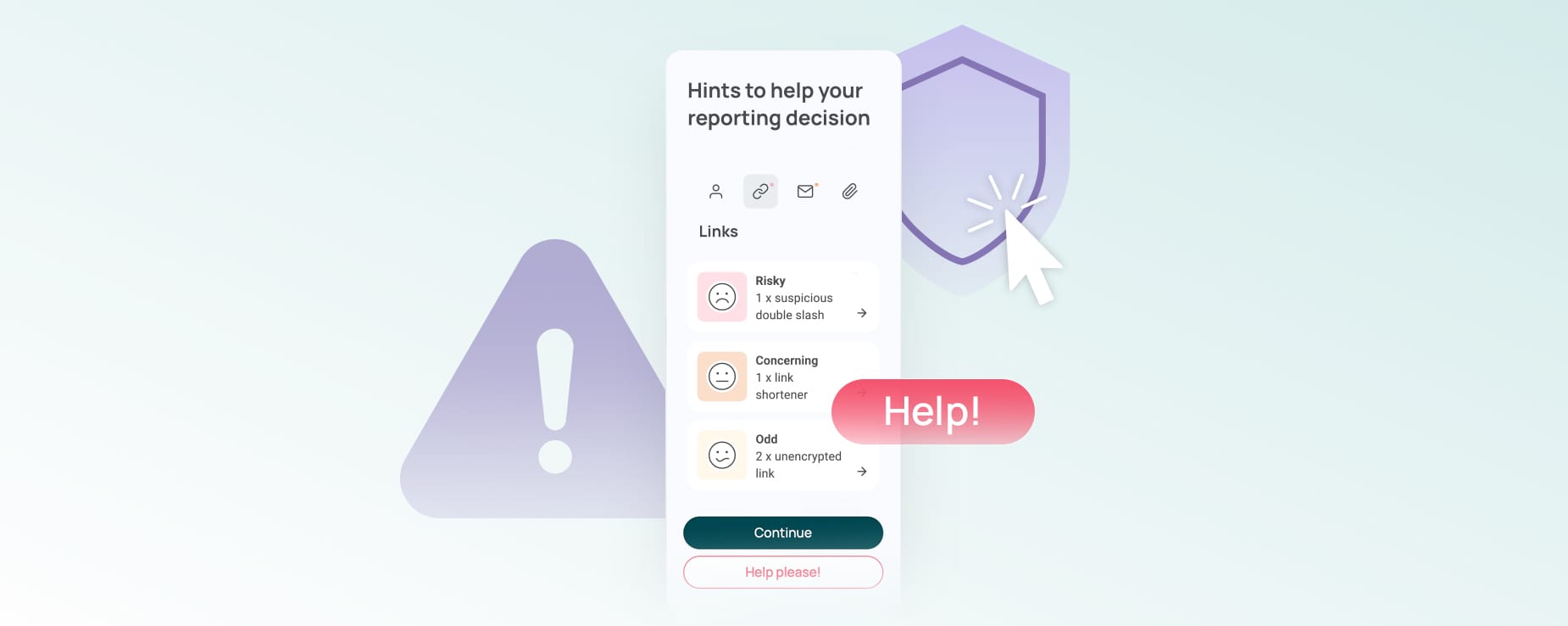
Pour être optimale, la procédure de signalement doit permettre aux collaborateurs d’expliquer ce qui a éveillé leurs soupçons sans être trop lourde et compliquée. Il suffit de demander à l’utilisateur si c’est l’expéditeur, le contenu, les liens ou les pièces jointes qui lui semblent suspects. Cela lui permet de mettre un mot sur ce qu’il a remarqué et fournit à l’équipe de sécurité plus de contexte qu’un simple mail transféré.
Pour faciliter cette démarche, nous avons créé, chez SoSafe, le bouton d’alerte phishing qui permet aux collaborateurs de signaler les e-mails suspects directement depuis Outlook ou Google, pour qu’ils n’aient même pas à quitter leur boîte mail.
Ce sont ces petits moments de friction qui peuvent décider de l’envoi ou non d’un signalement.
Il suffit parfois de changer quelques détails dans l’interface utilisateur pour faire évoluer les comportements de signalement. Lorsque nous avons conçu notre bouton d’alerte phishing, un membre de l’équipe SoSafe a fait remarquer qu’il pouvait mettre quelques secondes à charger. Nous aurions pu considérer ça comme peu de chose. Mais, dans la pratique, quelques secondes peuvent suffire pour que l’utilisateur passe à autre chose, perde le fil ou mette l’e-mail de côté « pour plus tard ». Notre équipe a donc décidé de remédier à ce problème et d’améliorer l’expérience utilisateur afin de garantir une procédure de signalement fluide qui convienne même aux personnes hésitantes ou surbookées.
Les Hints disponibles en option peuvent aider les collaborateurs à passer en revue certains détails précis (informations sur l’expéditeur, liens ou pièces jointes) avant d’envoyer leur signalement. Lorsque la fonctionnalité des Hints augmentés à l’IA est activée, le système peut même analyser le contenu du message pour attirer l’attention du lecteur sur les schémas suspects, la décision finale restant à la discrétion du collaborateur.
Cette méthode offre aussi aux utilisateurs l’occasion d’expliquer clairement ce qu’il s’est passé s’ils ont interagi avec l’e-mail. Si quelqu’un a cliqué sur un lien, ouvert une pièce jointe, répondu au message ou saisie des informations quelque part, il lui suffit de l’expliquer simplement. Ainsi informées, les équipes de sécurité pourront alors traiter ce cas en priorité ou l’adresser à la personne compétente.
Il n’est pas nécessaire de tomber dans le mélodrame pour inciter les collaborateurs à signaler les faits. Il faut juste mettre à leur disposition un système clair, rapide et sûr.
Utiliser les schémas de signalement pour repérer les lacunes au niveau des consignes
Les schémas de signalement peuvent être révélateurs d’un besoin de soutien de la part des collaborateurs. C’est notamment vrai si les mêmes comportements reviennent quelle que soit l’équipe, la situation géographique ou la forme de menace.
Penchez-vous d’abord sur le moment du signalement. S’il a été envoyé avant l’interaction, cela signifie que vos collaborateurs ont le bon réflexe de réfléchir avant d’agir. S’il survient après que les destinataires ont cliqué sur un lien, ouvert une pièce jointe ou saisi des informations, cela indique qu’ils ont peut-être besoin d’être mieux conseillés.
Examinez ensuite les différences de comportement d’une équipe à l’autre. Certains services signalent presque tout, d’autres quasiment rien. Ces écarts peuvent indiquer aux équipes de sécurité la prochaine mesure à prendre : envoyer des instructions plus claires sur le signalement, intégrer de meilleurs prompts pour aider les utilisateurs à faire les contrôles nécessaires avant de signaler une tentative de phishing ou proposer des exemples plus en phase avec leur réalité quotidienne.
Le bouton d’alerte phishing favorise également l’approche pédagogique lors des simulations. Lorsque les collaborateurs signalent une simulation de phishing SoSafe à bon escient, ils reçoivent immédiatement une confirmation. S’ils interagissent avec un e-mail de simulation de phishing, une courte page pédagogique leur explique ce qu’il s’est passé et les indices à surveiller la prochaine fois.
Lorsque les e-mails signalés sont véritablement suspects, ces signalements ont un grand intérêt pour l’entreprise. Avec des signalements plus clairs, les équipes de sécurité sauront plus précisément ce que les collaborateurs remarquent, comprendront mieux les événements qui ont précédé le signalement et pourront donc décider plus facilement des éventuelles suites à y donner.
Watch SoSafe Live | In Action: Adapting to Threats webinar to see how security teams can turn phishing reports into clearer signals, faster feedback and more adaptive follow-up.
Les articles suivants peuvent aussi vous intéresser :
 6 min read

Vous voulez avoir toujours une longueur d’avance en matière de cybersécurité ?
Inscrivez-vous à notre newsletter pour tout savoir sur les actualités, les événements et les ressources disponibles en matière de cybersécurité. Zéro spam, du contenu 100 % utile.



















 Rapports
  Guides
  Blog
Blog  Lexique de la cybersécurité
  Témoignages clients
  Inscription à la newsletter
  Tous les événements
  Signal Security Summit
  Danger Lab
  Webinaires
  Interview d'expert
 Pourquoi SoSafe
  Carrières
  Actu et presse
  Contact