Sciences comportementales
Mieux trier lorsque le nombre de signalements augmente
Dans le cadre des formations de sensibilisation à la cybersécurité, l’augmentation du nombre de signalements de phishing est souvent considéré comme un signe de l’efficacité du programme. Les collaborateurs sont plus vigilants, utilisent le canal de signalement mis à leur disposition et transmettent les e-mails suspects à la sécurité au lieu de s’en charger eux-mêmes.
Pour les équipes de sécurité, cette augmentation entraîne un surcroît de travail : plus d’e-mails à traiter, à classer et plus de réponses à envoyer.
Dans notre webinaire SoSafe Live | In Action : Adapting to Threats, Kevin Rodriguez Ladino, Chef de projet chez SoSafe, a évoqué le cas d’une équipe de sécurité qui recevait près de 1 000 e-mails de signalement par semaine, avec seulement 1 personne pour les gérer.
Il faut toujours ouvrir un e-mail de signalement, le contrôler, le classer et y répondre. Si ce travail est fait manuellement, l’augmentation du nombre de signalements peut entraîner une charge supplémentaire pour l’équipe de sécurité.
Les contrôles de sécurité des boîtes mail filtrent déjà les messages en amont, avant même qu’ils ne parviennent aux collaborateurs. Malgré cela, le traitement des signalements de phishing envoyés par les utilisateurs restent une lourde tâche pour les équipes de sécurité. Selon Microsoft, les e-mails suspects signalés par les utilisateurs constituent une charge opérationnelle persistante pour le SOC, sachant que chaque alerte peut nécessiter jusqu’à 30 minutes de tri manuel.
La question n’est donc pas seulement de savoir comment inciter plus de collaborateurs à signaler des menaces potentielles, mais aussi comment faciliter la compréhension de ces signalements, leur classement par ordre de priorité et leur utilisation.
Dans cet article, vous découvrirez comment traiter les signalements des collaborateurs plus efficacement pour le tri, le feedback et la formation continue.
Table des matières
Commencer par l’alerte contenue dans le signalement
Pour être utile, un signalement doit préciser les raisons qui font suspecter un message malveillant et ce qui s’est passé avant qu’il ne soit signalé.
Si les collaborateurs se contentent de transférer un e-mail vers une boîte de réception partagée, l’équipe de sécurité risque de manquer de contexte. La personne qui va analyser le signalement doit toujours pouvoir reconstituer les éléments de base : ce qui a attiré l’attention du collaborateur, s’il a cliqué, s’il a saisi des informations et si des signalements similaires ont été envoyés par d’autres équipes.
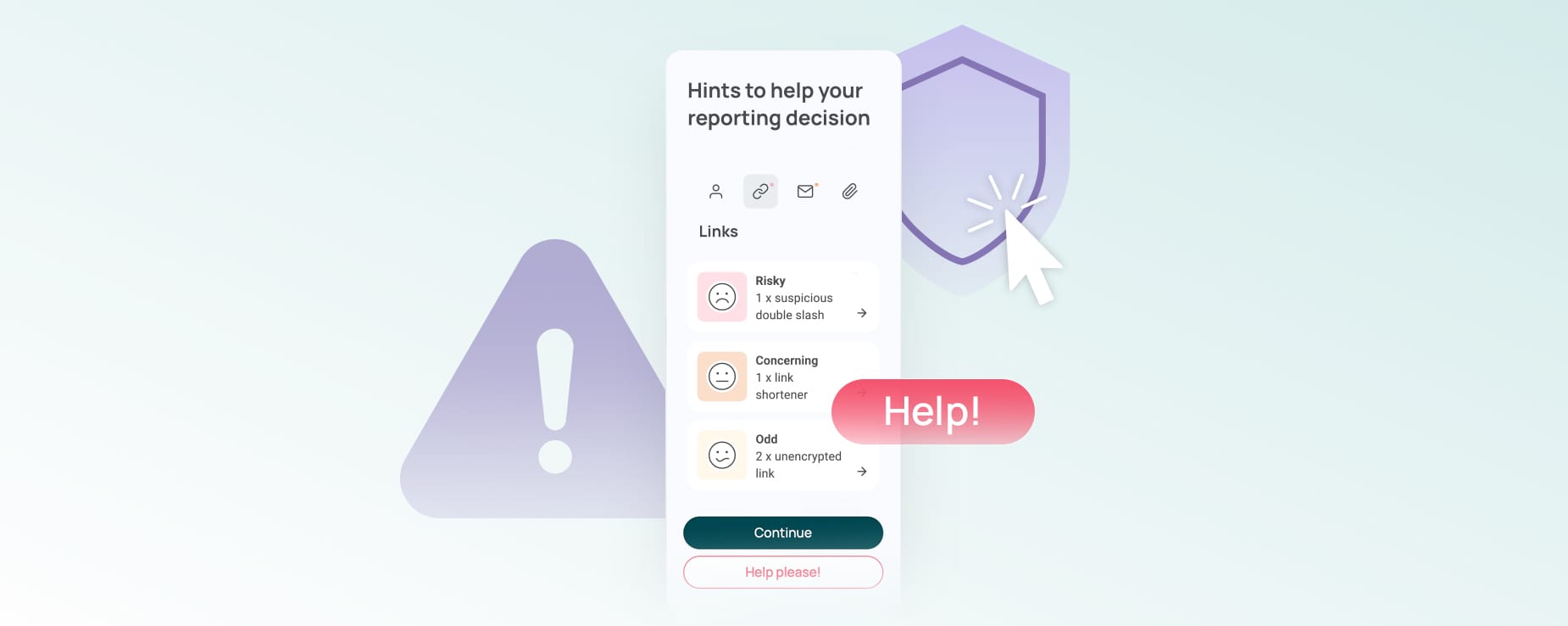
Chez SoSafe, nous avons notamment créé le bouton d’alerte phishing pour optimiser les signalements. Il permet aux collaborateurs de signaler les e-mails suspects directement depuis Outlook ou Google et d’indiquer le motif qui les inquiète : expéditeur, contenu, liens ou pièces jointes, par exemple.
Le signalement parvient ainsi avec un plus de contexte à l’équipe qui va le traiter. De leur côté, en sélectionnant la raison de leur sélection, les collaborateurs ont l’occasion de conscientiser ce qui a rendu ce message suspect, plutôt que d’envoyer un signalement uniquement parce que, dans l’ensemble, « quelque chose semblait clocher ».
La fonctionnalité Trusted Sender de SoSafe permet d’ajouter un niveau de contrôle supplémentaire. Si un e-mail provient d’un nom de domaine que l’entreprise considère habituellement comme sûr, les collaborateurs peuvent en être informés avant d’envoyer leur signalement. Cela ne les empêche pas pour autant de faire part de leurs soupçons, si nécessaire : un domaine de confiance n’est pas un gage absolu de sécurité.
Les Hints de SoSafe, quant à eux, attirent l’attention des collaborateurs vers des détails visibles tels que les informations sur l’expéditeur, les liens ou les pièces jointes. Lorsque les Hints augmentés à l’IA de SoSafe sont activés, l’outil peut également passer en revue le contenu du message et mettre en évidence des schémas suspects, tels que la notion d’urgence, une formulation étrange ou des demandes qui ne respectent pas les procédures habituelles. Le collaborateur reste maître de la décision finale d’envoyer ou non un signalement.
Orienter plus clairement les signalements d’interaction
Certains signalements nécessitent d’être pris en compte plus rapidement car le collaborateur a déjà interagi avec le message.
Un e-mail suspect avec lequel il n’y a pas eu d’interaction et un message qui a entraîné un clic sur un lien, l’ouverture d’une pièce jointe, l’envoi d’une réponse ou la saisie des données personnelles. Le bouton d’alerte phishing de SoSafe permet aux collaborateurs d’expliquer, avec leurs mots, ce qu’il s’est passé, sans avoir à décider s’il s’agit ou non d’un incident.
Il est alors plus facile, pour les équipes de sécurité, de déterminer l’ordre de priorité. Le signalement contient les faits, mais c’est l’équipe de sécurité qui décide des mesures à prendre.
Ne pas conserver les signalements dans des boîtes mail dispersées
Une fois les signalements reçus, les équipes de sécurité doivent disposer d’un espace structuré pour les étudier faute de quoi, les signalements qui étaient utiles finiront par se perdre dans des boîtes de réception dispersées, des tickets et des notes manuelles.
La Threat Inbox de SoSafe est conçue pour cette partie du flux de travail. Elle offre aux équipes une vue centralisée des e-mails signalés dans le tableau de bord SoSafe, avec des filtres pour des attributs tels que les indicateurs d’incident, les liens ou les pièces jointes. Les équipes peuvent inspecter le contenu complet, les détails de l’expéditeur, les liens, les pièces jointes et les en-têtes dans un environnement sécurisé.
Après enquête, les équipes peuvent classer l’e-mail et envoyer une courte réponse au collaborateur qui l’a signalé. La boucle est ainsi bouclée et l’utilisateur sait que cela vaut la peine d’envoyer des signalements à l’avenir.
La Threat Inbox de SoSafe est actuellement disponible en version bêta (à l’heure où nous écrivons, en juin 2026). Vérifiez sa disponibilité en fonction de votre environnement.
Transformer les menaces confirmées en formation continue
Ne vous contentez pas de clôturer les signalements comme vous le feriez avec des tickets. Certains méritent d’être utilisés comme support de formation.
Si une véritable attaque a atteint les collaborateurs et été signalée, elle peut être révélatrice d’une tactique bien menée, d’une formulation convaincante ou d’une arnaque spécifique à un flux de travail donné. Elle sera bien plus utile pour vos efforts de sensibilisation qu’un exemple générique que vous avez créé des mois plus tôt.
La fonctionnalité Recreate Attack de SoSafe facilite cette démarche. Lors de notre webinaire, les animateurs ont montré qu’une simple capture d’écran d’un e-mail pouvait être transformée en modèle de simulation de phishing et intégré dans une campagne de sensibilisation en quelques minutes. Cette fonctionnalité permet aux entreprises de ne plus simplement communiquer sur « ce qui nous a touchés », mais sur « ce à quoi nous devrions nous former désormais » sans attendre qu’un modèle personnalisé soit créé de A à Z.
L’augmentation du nombre de signalements de phishing n’est, en fin de compte, utile que si l’équipe de sécurité peut préserver l’alerte qu’ils contiennent. Pour être optimal, l’outil de gestion des signalements doit permettre aux collaborateurs d’expliquer ce qui s’est passé, accélérer le tri au niveau des équipes de sécurité et favoriser la réutilisation de ces attaques réelles pour développer une formation pour pointue.
Watch SoSafe Live | In Action: Adapting to Threats webinar to see how security teams can turn phishing reports into clearer signals, faster feedback and more adaptive follow-up.
Les articles suivants peuvent aussi vous intéresser :

 7 min read

Vous voulez avoir toujours une longueur d’avance en matière de cybersécurité ?
Inscrivez-vous à notre newsletter pour tout savoir sur les actualités, les événements et les ressources disponibles en matière de cybersécurité. Zéro spam, du contenu 100 % utile.

















 Rapports
  Guides
  Blog
Blog  Lexique de la cybersécurité
  Témoignages clients
  Inscription à la newsletter
  Tous les événements
  Signal Security Summit
  Danger Lab
  Webinaires
  Interview d'expert
 Pourquoi SoSafe
  Carrières
  Actu et presse
  Contact