Behavioural Science
Why high phishing reporting needs better triage
In security awareness training, higher phishing reporting is often treated as a sign that the programme is working. Employees are paying attention, using the reporting channel and bringing suspicious emails to security instead of dealing with them alone.
For security teams, that also means more emails to review, classify and respond to.
In ourSoSafe Live | In Action: Adapting to Threats webinar, Kevin Rodriguez Ladino, Product Manager at SoSafe, described one security team receiving around 1,000 reported emails per week, with only 1 person handling the inbox.
A reported email still has to be opened, checked, classified and answered. If that process relies on manual review alone, strong reporting can quickly become another backlog for the security team.
Email security controls already do a lot of filtering before messages reach employees. Still, user-reported phishing remains a heavy workload for security teams. Microsoft describes user-reported suspicious emails as a persistent SOC burden, with each alert potentially requiring up to 30 minutes of manual triage.
So the question is not only how to get more employees to report. It is how to make each report easier to understand, prioritise and use.
In this article, you’ll learn how to treat employee reports as a clearer signal for triage, feedback and follow-up training.
Table of contents
Start with the signal inside the report
A useful report should help the security team understand why the email looked suspicious and what happened before it was reported.
That context often gets lost when employees simply forward an email to a shared mailbox. The analyst still has to reconstruct the basics: what caught the employee’s attention, whether they clicked, whether they entered details and whether similar reports are coming from other teams.
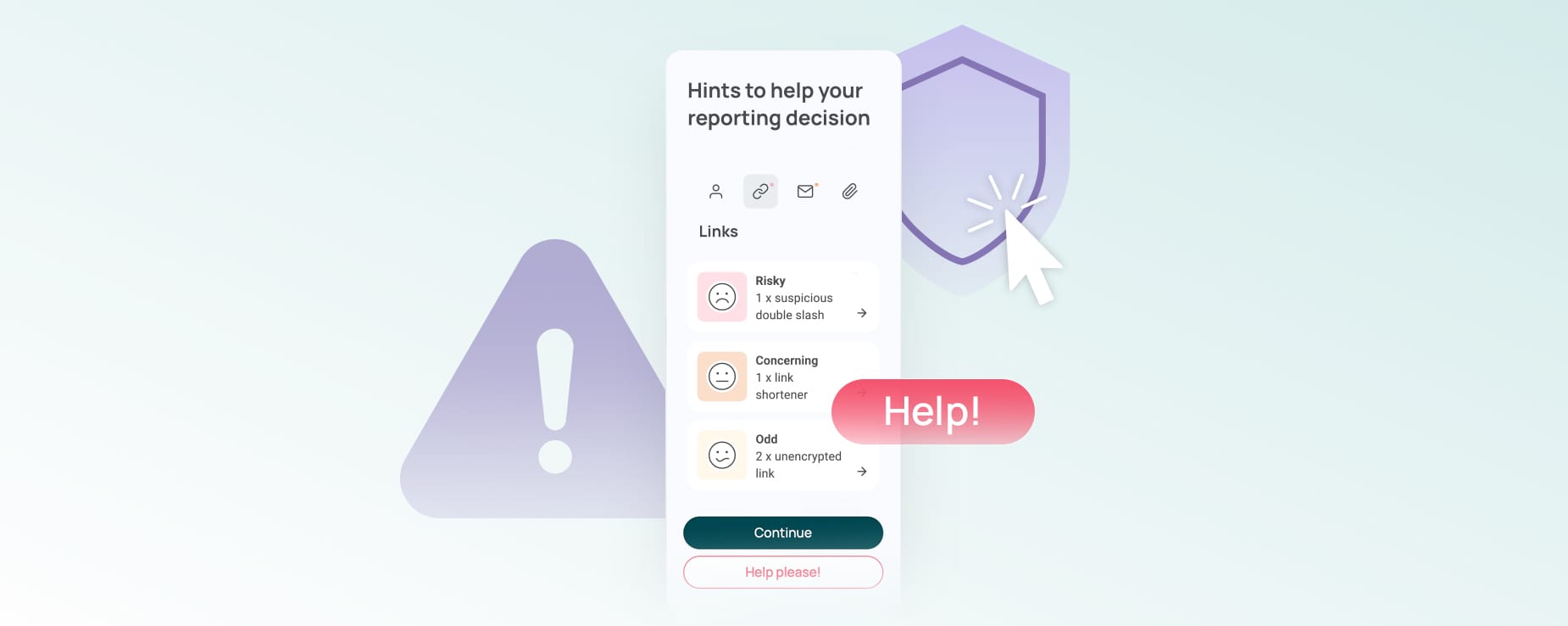
One way we support this is through the SoSafe Phishing Report Button. Employees can report suspicious emails directly from Outlook or Google and choose why they are reporting. Their concern may be the sender, content, links or attachments.
That small classification step helps the report arrive with more context. It also nudges employees to inspect what made the email feel suspicious, rather than reporting only because something felt generally off.
SoSafe Trusted Sender guidance can add another useful check. If an email comes from a domain the organisation usually considers safe, employees can see that context before they report. They can still submit the report, because a trusted domain does not guarantee that every message is safe.
SoSafe Hints can point employees towards visible details such as sender information, links or attachments. Where SoSafe AI Hints are enabled, the system can also review message content and highlight suspicious patterns, such as urgency, unusual wording or requests that bypass normal processes. The employee still decides whether to report.
Give interaction reports a clearer path
Some reports need faster attention because the employee already interacted with the email.
A suspicious email with no interaction is different from one where someone clicked a link, opened an attachment, replied or entered personal data. SoSafe Phishing Report Button lets employees describe what happened in plain language, without deciding whether it qualifies as an incident.
That helps security teams prioritise. The report carries the facts, and the team decides what action is needed.
Keep reports out of scattered inboxes
Once reports come in, teams need a structured place to review them. Otherwise, useful signals end up spread across mailboxes, tickets and manual notes.
SoSafe Threat Inbox is designed for that part of the workflow. It gives teams a central view of reported emails in the SoSafe dashboard, with filters for attributes such as incident flags, links or attachments. Teams can inspect full content, sender details, links, attachments and headers in a safe environment.
After investigation, teams can classify the email and send a short response to the employee who reported it. That closes the loop and makes future reporting feel worth the effort.
SoSafe Threat Inbox is currently in beta (as of June 2026), so availability should be confirmed for each environment.
Turn confirmed threats into follow-up
Reports should not only close as tickets. Some deserve to become learning material.
If a real attack reaches employees and gets reported, it can reveal a relevant tactic, wording pattern or workflow-specific lure. That is far more useful than a generic example created months earlier.
SoSafe Recreate Attack helps with that step. In the webinar, the team showed how a screenshot of an email can be turned into a phishing template in a few minutes and added to a campaign. It helps teams move from “this is what hit us” to “this is what we should train around next” without waiting for a custom template to be built from scratch.
More phishing reports are only useful when the team can preserve the signal inside them. The best reporting workflows help employees explain what happened, help security teams triage faster and turn real attacks into sharper learning.
Watch SoSafe Live | In Action: Adapting to Threats webinar to see how security teams can turn phishing reports into clearer signals, faster feedback and more adaptive follow-up.
You might also be interested in:

 7 min read

Do you want to stay ahead of the cyber game?
Sign up for our newsletter to receive the latest cyber security articles, events, and resources. No spam, only content that truly matters.





















 Reports
  Guides
  Blog
Blog  Glossary
  Perks
Perks  Customer stories
  Newsletter signup
  Webinars
  Replays
  Podcast
  All events
  Signal Security Summit
  Danger Lab
 Why SoSafe
  Careers
  News & press
  Contact