
Human Firewall: The Key to Cyber Resilience
Technology alone can’t protect your organisation. People are the first line of defence against cyber attacks. A strong human firewall spots attacks early, helping to prevent damage before it happens.
Contents
- Meaning: What is a human firewall?
- Why does your organisation need one?
- Best-practice examples
- Requirements
- Building a human firewall
- Measuring success
Key takeaways: Human Firewall
- Employees spot attacks and limit damage through security-conscious behaviour
- Awareness training, workshops, phishing simulations and simple reporting channels embed security into everyday work
- Leadership sets the tone by leading by example, defining clear responsibilities and building a culture that treats mistakes as learning opportunities
- Click and reporting rates in the security dashboard make the progress of your human firewall visible
- Human behaviour complements technical safeguards
Meaning: What is a human firewall?
Employees bring security-conscious behaviour and skills to handling cyber threats. That’s the human firewall meaning in practice, and it’s how we’d define a human firewall too. When something looks suspicious, they spot it early, respond appropriately, and make sure it gets reported quickly and correctly. Technical safeguards support this, but they can’t do it alone.
Curiosity, time pressure and an urge to help are exactly what social engineering plays on. Security teams sometimes call this human malware. A strong human firewall doesn’t remove that pressure, but it gives people something to do with it. There’s a clear owner when something goes wrong. There’s an obvious way to report it. And there’s enough awareness that people actually notice in the first place.
Regulation is moving in the same direction. The EU’s Cyber Resilience Act requires secure processes across a product’s entire lifecycle, for example. Training, clear procedures and traceable reporting stop being optional under rules like that.
Why does your organisation need a human firewall?
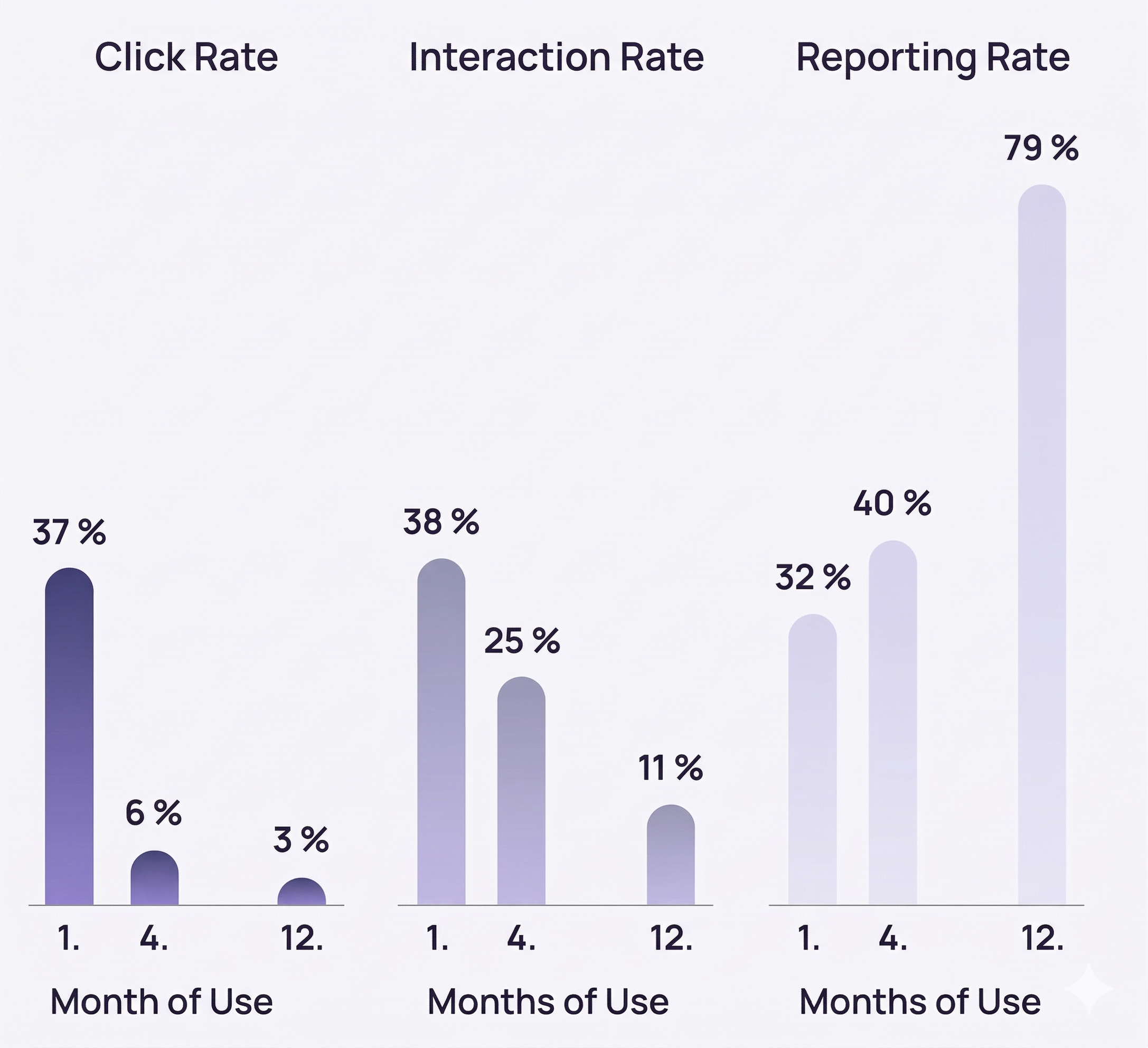
More than a third of people click on malicious content in phishing emails – and almost two in five of them go on to interact further with it. At the same time, data from SoSafe’s Human Risk Review tells a different story: after twelve months of awareness training, the rate at which employees reported suspicious activity tripled. A well-built human firewall reduces risky behaviour and measurably improves how quickly organisations respond.
Human firewall examples in practice
Real-world incidents show how much employee behaviour matters, and which routines actually help. The following human firewall examples set out how security-conscious action stopped an attack, or limited the damage once one was underway.
Case 1: Loss of control during a penetration test
As part of a red-teaming exercise, external security experts gained physical access to a company site through a staged job interview. Without being challenged, they reached internal offices and found unprotected network access points there. From there, they accessed internal systems, escalated their permissions, and were able to remotely control key components. On their way out of the building, they also managed to walk off with a set of company car keys. You can read more about the incident on heise (in German).
How could the human firewall have worked better here?
Unusual admin rights need to be reported early, questions get asked through defined channels, and clear escalation paths are in place. That’s what stops lateral movement before it causes damage, a textbook example of the human firewall in action.
Case 2: MGM Resorts, ransomware after helpdesk vishing
Attackers posed as internal IT staff over the phone and tricked the helpdesk into resetting sensitive login credentials. That gave them access to privileged accounts and set the stage for a ransomware deployment. Within a very short time, core booking and payment systems were offline, and operations across several hotels ground to a halt. The group behind the attack, known as Scattered Spider, used psychological pressure and calculated deception in the style of classic social engineering. More detail is available via Reuters.
How could the human firewall have worked better here?
Calling back on verified numbers, requiring proper identity checks, and following fixed reset policies would have protected the helpdesk process from social engineering.
Case 3: Arup and the $25 million deepfake video call
In January 2024, a finance employee at the multinational engineering firm Arup received an email that appeared to come from the company’s UK-based CFO, asking for a confidential transaction. The employee was suspicious of the email. To resolve the doubt, they asked for a video call to confirm it was genuine. On that call, the CFO and several colleagues appeared to be present. Every one of them was a deepfake, built from publicly available video and audio of the real executives. Convinced by what looked and sounded like a room full of familiar colleagues, the employee went ahead with the transaction: fifteen transfers, totalling around $25.6 million, to five bank accounts in Hong Kong. The fraud only came to light when the employee later checked in with Arup’s head office. More detail is available via CNN.
How could the human firewall have worked better here?
The employee did the right thing by questioning the email. What taught them a lesson was trusting the video call more than the message that started it all. Faces and voices aren’t proof anymore. For payments like this, someone still needs to pick up the phone and call a number they already know, not one given to them on the call itself.
Requirements for a functioning human firewall
A human firewall takes hold where security becomes part of everyday life. It’s built on clear processes, tangible support from leadership, and a training programme that turns knowledge into behaviour. Simple reporting channels, an open error culture and ongoing chances to build skills matter. Only when these elements work together does the human firewall actually contribute to cybersecurity.
Leadership and clear responsibilities
Leaders model secure behaviour themselves. Responsibilities are clearly assigned and mapped in a RACI matrix. Sponsorship and budget keep implementation on track.
Secure and simple reporting channels
Low-barrier channels – a report button, hotline, chat, or a clearly communicated email address – make reporting easier. The path from a report to a ticket being created is designed to take under a minute. Protection for the person who reports is upheld through a no-blame principle and transparent feedback.
Binding policies and training
Some policies just have to exist: IT use, communication, passwords, software, third-party access. Everyone works through the mandatory modules first. After that it depends on the role – someone in finance or IT admin needs more depth than someone in marketing, so the training reflects that. None of it works as a one-off, though. Microlearning brings things back to mind later, in-app prompts catch people while they’re actually doing the task, and simulations get debriefed afterwards instead of just scored and forgotten.
Standardised processes and the right tools
When reporting is standardised, response times drop. Ticket autofill saves time, playbooks give helpdesk and first-level support a clear answer for follow-up questions, and clearly defined escalation SLAs make sure nothing sits unresolved. Visible KPIs on the dashboard and security briefings during onboarding and offboarding – including access checks and shadow IT checks – round it out.
Building a human firewall: programme and training
Building a human firewall means pulling several measures together so they reinforce each other rather than running separately. Ideally, someone notices something suspicious, reports it without friction, and hears back once it’s been dealt with.
Core building blocks
- Cybersecurity awareness training with personalised microlearning and storytelling
- Phishing simulations with instant feedback
- A phishing report button as an Outlook add-in for one-click reporting
- A human risk dashboard tracking click, reporting and behavioural metrics
- The AI chatbot “Sofie” for follow-up questions, directly in Teams or Slack
How the human firewall process works
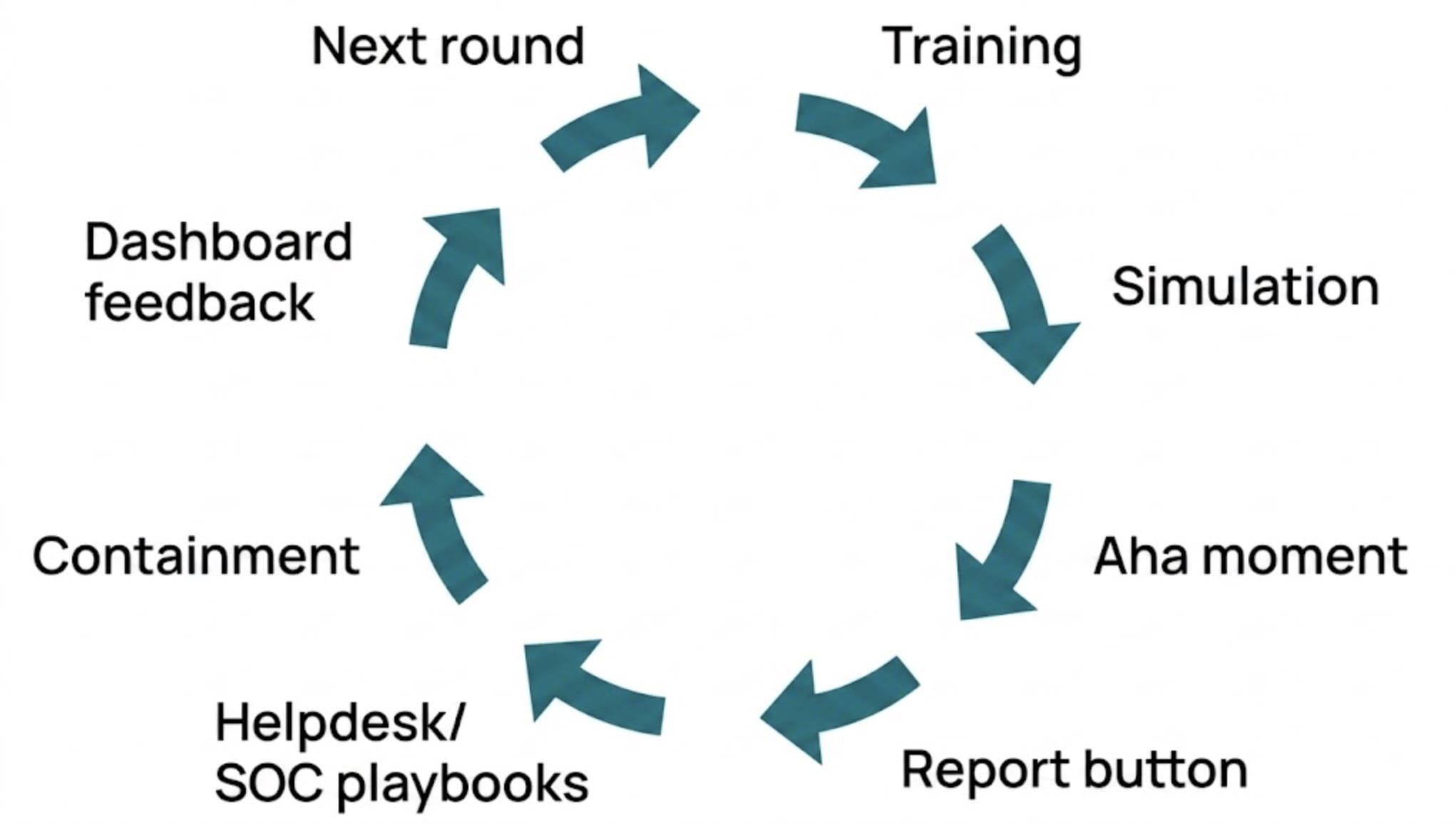
Rolling out SoSafe in three phases
Phase 1: Launch and initial setup (days 1 and 2)
Day one starts by activating the platform and connecting SSO and the user directory. The report button follows shortly after. Reporting targets get defined at this stage too. A few baseline scenarios are prepared, and the first microlearnings unlock. The dashboard is configured last, ready to go before day two ends.
Phase 2: Pilot and fine-tuning (from day 3)
A pilot group works through the initial simulations, with instant feedback built in. At this stage, “Sofie” comes online to handle any follow-up questions. Helpdesk and SOC teams test their playbooks against real cases. Callback procedures get the same treatment.
Phase 3: Roll out the programme
The pilot proves itself, then everyone joins. The report button stops being new and becomes routine. Microlearnings and simulations continue on a steady rhythm. Reporting suspicious messages becomes second nature over time. Leadership checks in on the dashboards periodically, using what surfaces there to adjust policies.
Build your human firewall
See how SoSafe turns this rollout into your organisation’s human firewall.
Measuring success and improving continuously
Only what gets measured can be properly managed. Pick a few metrics that are easy to understand. They should be quick to collect and make sense to both teams and management.
Reducing the phishing click rate
Track the click rate across several campaigns. If training is working, fewer people react to simulated phishing emails over time.
Increasing the reporting rate
This tracks how many employees actively flag suspicious content, whether through a report button or another channel. A high reporting rate shows people are paying attention and know what to do about it.
Measuring training participation and knowledge
Completion rates and knowledge checks show whether the content actually landed. Look at these figures alongside simulation results for the fuller picture.
Observing everyday security behaviour
Check whether two-factor authentication is actually being used day to day, not just switched on somewhere. Unusual requests should get flagged rather than quietly ignored. Spot checks and feedback from within the team help build a realistic picture of behaviour.
Making the numbers visible
A short monthly report covering the basics – click rates, reporting numbers, training progress. Quarterly is when it’s worth actually acting on what that data shows. These KPIs fit naturally under Enterprise Cyber Security. The SoSafe dashboard can show the same numbers alongside them.
Your employees make the difference here, day after day, whether or not anyone’s paying attention in the moment. Give them clear routines and they’ll use them. Pick one small, measurable step and start there. The rest of your human firewall can grow from that.
The Human Firewall that you can activate in days instead of months




















 Reports
  Guides
  Blog
Blog  Glossary
  Perks
Perks  Customer stories
  Webinars
  Replays
  Podcast
  All events
  Signal Security Summit
  Danger Lab
 Careers
  News & press
  Contact