Vishing: how to recognise and prevent attacks over the phone
Key takeaways
- Vishing in cyber security joins “voice” and “phishing”: calls in which criminals obtain credentials, MFA codes or approvals by pretending to be someone else
- Interactive voice phishing accounted for 11% of initial infection vectors in Mandiant’s M-Trends 2026, ahead of email phishing at 6%
- Most callers impersonate the IT help desk, senior management or an external service provider, and the call rarely arrives alone: an email or message usually goes with it
- A vishing attack gives itself away in the request, not in the voice, because neither a caller ID nor a familiar tone proves who is on the line
- Verification at the help desk, callbacks to numbers held in the company directory, approval through a second channel, phishing-resistant MFA and behaviour practised in security awareness training are what reduce the risk in practice
No security filter listens in on a phone call. What stops a vishing attack is an established process that no caller can talk their way around.
Contents
- What is vishing in cyber security?
- How does vishing work?
- Types of vishing attacks
- Vishing examples
- AI vishing and deepfake calls
- Why vishing attacks are dangerous
- Detect a vishing attack
- How to prevent vishing
What is vishing in cyber security? Voice phishing over the phone
Vishing in cyber security stands for voice phishing and describes attempted fraud over the phone, in which attackers set out to obtain confidential information, capture credentials or trigger a payment. The word joins “voice” and “phishing”, and the mechanics behind both are identical: phishing works by email, smishing by text message, and vishing moves the same psychological pressure into a live conversation.
Voice over IP (VoIP) supplies the technical basis. It lets attackers place large numbers of calls in a short space of time, obscure where those calls come from and manipulate the number shown on the display. With caller ID spoofing, the person picking up sees a familiar area code, the number of head office or the extension of the internal help desk. A targeted spear vishing call goes further still and is aimed at one individual, prepared with research into roles, projects and reporting lines. That research is what makes the request sound like an ordinary internal one.
Incident response data shows how much ground the method has gained. For the M-Trends 2026 report, Mandiant’s incident response team reviewed the security incidents it worked on in 2025 and traced 11% of initial compromises to direct voice phishing, second only to the exploitation of vulnerabilities. Conventional email phishing accounted for 6% of cases over the same period. Email gateways have improved considerably in recent years, and one reading of the shift is that attackers are moving to a channel where no gateway exists.
The difference between phishing, smishing and vishing lies in the channel and in the time available to react. All three belong to the same family of attacks and are separated mainly by the medium. A suspicious email can be checked, forwarded or ignored. A call demands an answer on the spot, and every verification step costs time the caller can hear passing.
Criminals frequently combine these channels, because a call announced in advance lends a later message more credibility. An attacker mentions an incoming email during the conversation, or refers in writing to a call still to come. Once two channels corroborate each other, a vishing attack becomes considerably harder to see through in time.

How does vishing work? The attack chain in five steps
In an organisational setting, a vishing attack follows a recognisable sequence. Before anyone picks up the phone, attackers assemble a picture of the target from LinkedIn profiles and company websites, adding the names of managers, out-of-office replies and project titles. The US authorities CISA and FBI describe the chain that follows in a joint advisory, based on incidents against IT help desks and outsourced service providers.
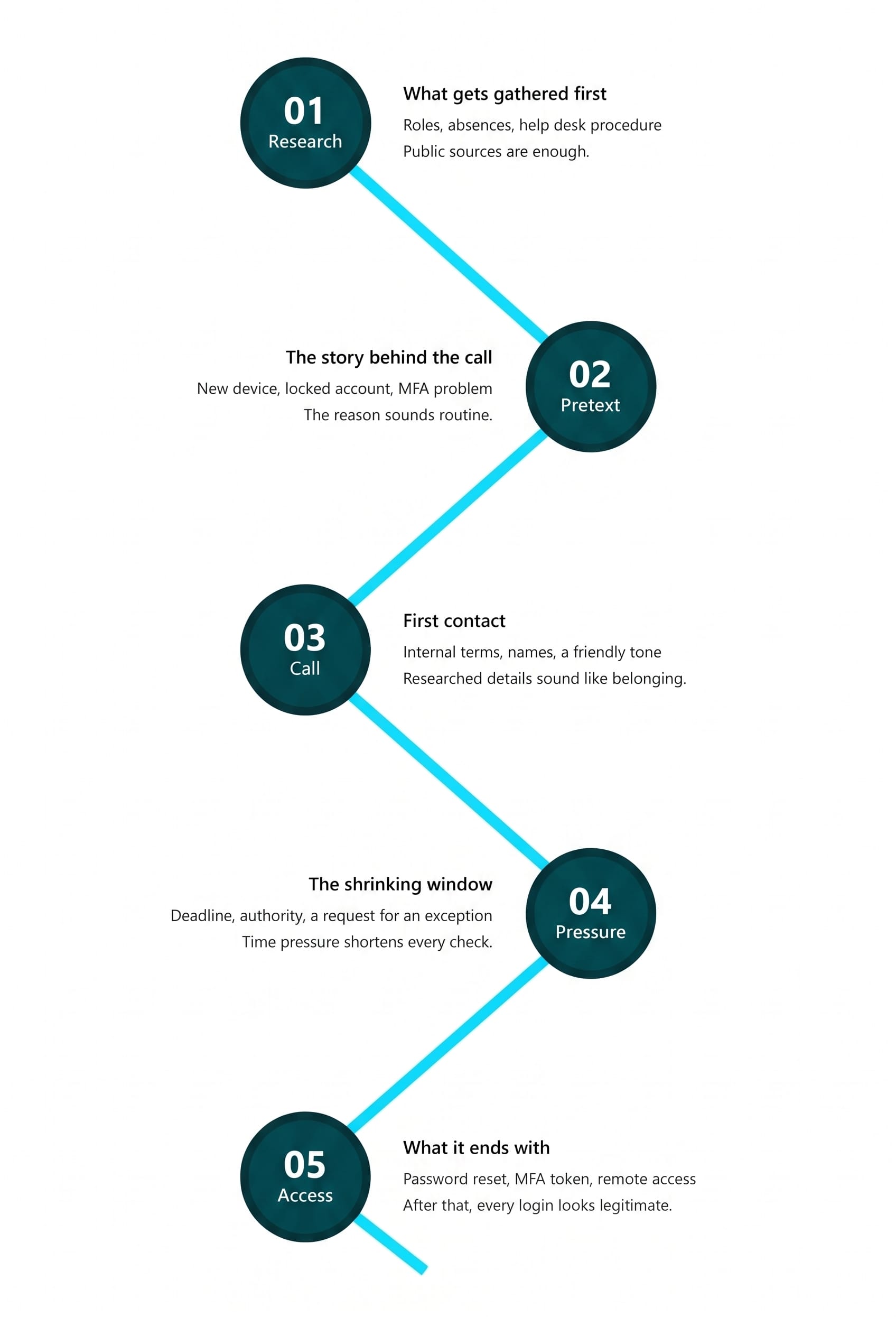
What matters for defence is that no single step has to look suspicious on its own. An employee who mentions the names of her managers assumes she is sharing nothing of consequence. A help desk agent who resets a password after hearing the correct personal details is following what looks like routine. Vishing works in the gaps between responsibilities, and only the full chain of preparation, pretext and pressure turns those gaps into an incident.
Types of vishing attacks in a corporate environment
What is a common tactic used in vishing attacks? Most calls follow the same basic pattern: The caller takes on a role that is already part of the working day and adds a reason why the matter cannot wait. The tactic underneath almost every vishing attack is the same combination: a trusted role, plus urgency that makes verification feel like an obstacle.
- A familiar role, such as IT support, senior management, a service provider or a public authority
- An exceptional situation that rules out the usual procedure
- Time pressure, which makes the security check look like a formality worth skipping
- A small request with real consequences: an MFA code, an approval click, a reset account
The most common vishing scams in a business setting follow six recurring patterns.
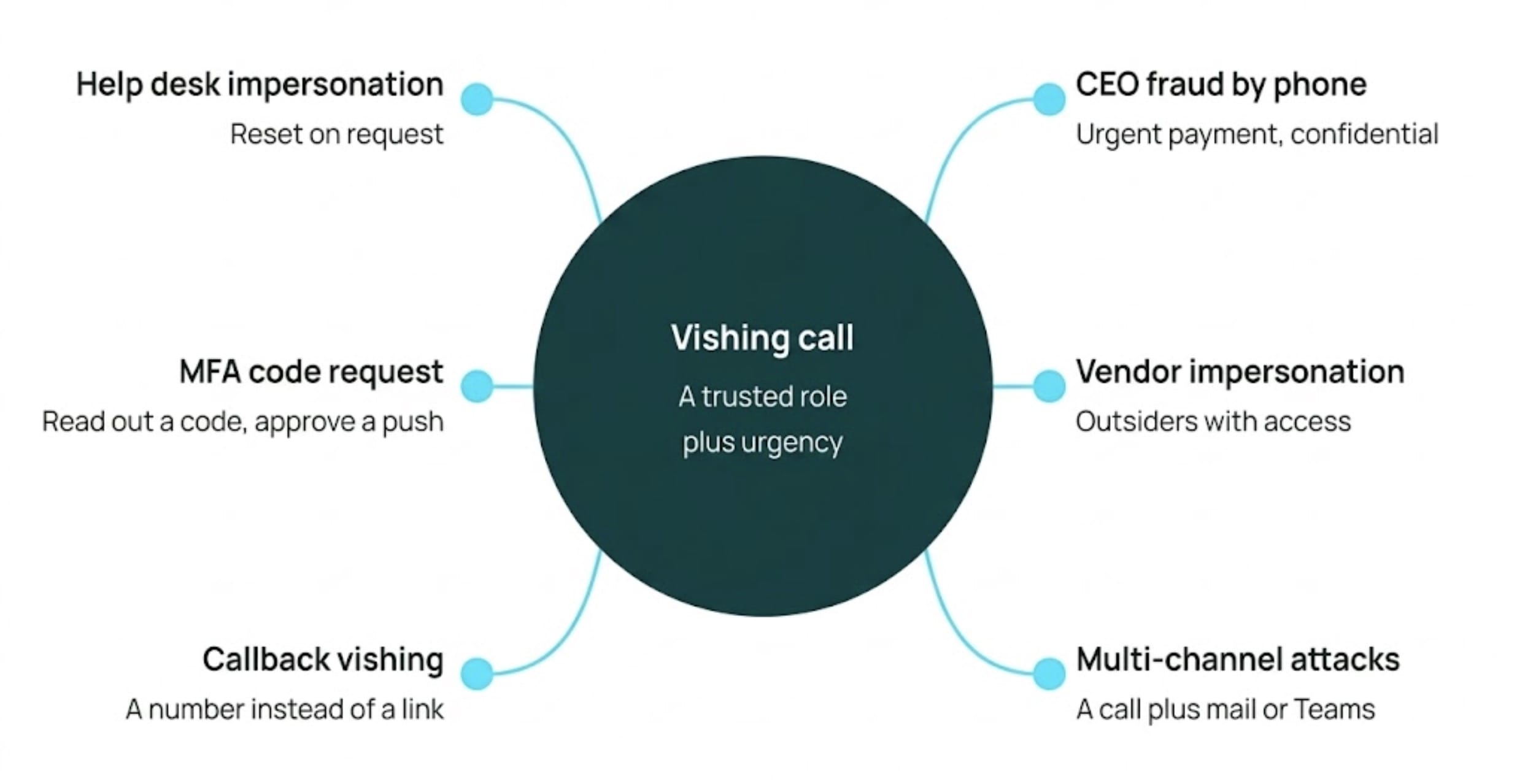
Help desk impersonation
Here the call is aimed not at the intended victim but at IT support directly. The caller poses as an employee locked out of their account and asks for a password reset or the re-enrolment of an MFA token. Support teams are measured on how quickly they resolve tickets, and that willingness to help is exactly what the attacker is counting on.
MFA fatigue and code requests
Some attackers ask for the one-time code during the call itself: “I’ve just sent you the approval code, could you read it back to me?” Others start login attempts in parallel. A third approach pairs the conversation with an MFA fatigue attack: the voice on the line keeps the pressure up while the phone shows one push notification after another, until someone approves one to make it stop.
CEO fraud over the phone
With CEO fraud, the call goes to the finance team or to an executive assistant in the name of senior management. What it asks for is an urgent and confidential transfer, or business data needed for an acquisition that is, of course, equally confidential. Fake emails often prepare the ground beforehand, and a cloned voice sometimes accompanies the call.
Vendor and IT provider impersonation
The caller claims to be from an IT provider, an audit firm or a logistics partner. This works because partnerships are usually a matter of public record and third-party access is nothing unusual in day-to-day operations. Outsourced help desks are a frequent target: they administer user accounts for several clients at once, which by design puts them at a distance from any one client’s internal structures.
Callback vishing
Attackers send a phishing email with a fake invoice or security alert that contains no malicious link, only a phone number. Anyone who dials it reaches the attackers’ own call centre. Because the victim initiated the contact, the usual scepticism about an unexpected caller never comes into play, and the supposed support agent can walk them through installing remote access software step by step.
Multi-channel attacks
A vishing attack rarely arrives on its own. Attackers announce a message before it lands, or supply the explanation straight afterwards: “I’ve just sent you something, could you confirm it for me?” They use text messages (smishing), email and collaboration tools such as Microsoft Teams or Slack to build pressure and to corroborate the story. Once two channels agree with each other, the pretext becomes far harder to question.
Vishing examples: three documented cases and one exception
Real vishing attack examples show that this kind of attack needs neither sophisticated software nor a vulnerability in anyone’s code.
Marks & Spencer (spring 2025): the outsourced provider
The British retailer Marks & Spencer came under attack in the spring of 2025. Callers reached the company’s outsourced IT help desk, posed as employees and had passwords and MFA factors reset. According to reporting by the BBC, the attackers obtained credential resets for the accounts of affected staff. The incident prompted the UK’s National Cyber Security Centre to issue an explicit warning about attacks on identity and service desk functions.
Clorox v Cognizant (August 2023): a $380 million lawsuit
In August 2023, attackers gained access to the systems of the US consumer goods company Clorox. The complaint filed in July 2025 alleges that someone called the Indian service desk run by its provider Cognizant, gave the name of a Clorox employee and asked for a password reset. Clorox says it is relying on recordings of those calls. According to the complaint, the agent reset the password without carrying out the required identity check, and the same caller had the multi-factor authentication and the phone number registered for MFA codes reset later the same day. Cognizant disputes the allegations and points to Clorox’s overall responsibility for its own security architecture. Whatever the court makes of it, the case shows how little effort an attack takes once a single verification step is missing, and how expensive the dispute over that step can become.
Microsoft Incident Response: two said no, the third did not
In March 2026, the Microsoft Incident Response team published its analysis of an attack from November 2025. A threat actor posing as IT support approached several employees over Microsoft Teams. The first two turned the offer of help down and reported it. The third accepted, set up a Quick Assist session and gave the attacker administrative access. What makes the case instructive is the sequence: attackers work through a list until someone says yes. Microsoft recommends blocking incoming Teams messages from accounts outside the organisation and removing remote support tools such as Quick Assist wherever they are not needed.
Prepare your team for calls like these
Awareness training builds the reflexes people need mid-conversation, with 90% knowledge retention after 12 months.
TDK Electronics: the call that stood out
A vishing attempt that fails rarely makes it into the record. Thomas Zeulner, CISO and Global Head of Security at TDK Electronics, described one on the Human Firewall Podcast (in German). An employee in Spain took a call from someone claiming to be the group’s president. She was in a meeting, stepped outside, asked him to call her back on a landline and recorded the second conversation. The caller was irritated at having to ring twice, pushed harder and tried to draw information out of her. She gave him nothing.
What gave him away was not the voice, which had not been cloned, but the behaviour: the supposed president did not sound like the man she knew. The callback itself was no identity check, as Zeulner points out in the episode, because landline numbers can be spoofed too. What helped was the time she bought and a culture in which questioning someone at the top of the company is possible. TDK now uses the recording as internal training material, which turns one deflected call into something the rest of the organisation can learn from.
AI vishing and deepfake calls change the conversation
Generative AI and voice cloning have changed how a vishing call works. What once required a capable actor can now be produced from a short recording of the person being imitated.
Public material supplies that recording: a podcast appearance, a conference talk, a social media clip or a forwarded voice message. For the person picking up, AI vishing changes one thing above all. A familiar sound, a habitual turn of phrase, the right form of address were never proof of identity, but in practice they worked as a first filter. When the voice of the CEO is indistinguishable from the real one, that filter is gone, and security decisions can no longer rest on what someone sounds like.
Two approaches have been observed. Pre-trained voice profiles serve targeted attacks on named individuals; text-to-speech systems with AI-driven dialogue handle campaigns aimed at many people at once. Because the voice is generated live, the caller can respond to questions rather than read from a script. Some systems also translate accents and languages in real time, which removes the language barrier that used to keep attackers away from certain targets. What used to fail because the voice was wrong is now repeatable across any number of calls. Freely available tools have lowered the barrier to entry accordingly.
For security teams the conclusion is short: a voice is not an authentication factor. How the technology works in detail, which artefacts can still give a synthetic voice away and what attack variants follow from it is covered in our separate piece on AI voice cloning.
Why vishing attacks are so dangerous for organisations
The risk sits in the gap between effort and effect. On the attacker’s side there is very little: a spoofed number, a VoIP connection and research anyone can do. On the other side is an administrative credential, a bypassed MFA prompt or an approved payment.
Unlike a phishing email, a phone call passes no security gateway on its way in. No spam filter reads the conversation, no endpoint protection blocks a voice. And because the access that follows uses legitimate credentials, the detection systems further down the chain have little to flag: the attacker signs in through the official VPN and moves through the environment like any other user. Unauthorised access of that kind tends to run for some time before anything looks wrong.
The attack surface has shifted with it. According to the Verizon Data Breach Investigations Report 2026, 41% of social engineering attacks now use a channel other than email, with around a quarter running over social media or the phone. An organisation that trains only against email phishing leaves those channels untouched. The same goes for measurement: click rates on simulated emails say nothing about how staff handle an unexpected call, and a risk picture built from email data alone has a blind spot where the phone should be.
Vishing also lands in the regulatory file. An entry point that depends entirely on human manipulation still has to be accounted for in audits and supervisory evidence. Within the EU, the NIS2 Directive requires appropriate cybersecurity risk management measures under Article 21, including training in cyber hygiene, and DORA obliges financial entities under Article 13 to run regular awareness programmes for all staff.
Detect a vishing attack: four signals in the conversation
Four warning signs in a live call are worth reacting to immediately.
• Unexpected urgency
Urgency is the most reliable way to disable a checking routine, and callers use it deliberately. A system is about to be switched off, an audit is about to fail, management needs the approval within the next half hour. The deadline is always short enough to rule out asking anyone.
• Requests for credentials and codes
The call works towards one of three things: a spoken password, a one-time code read out from an authenticator app, or a push notification approved on the device. No internal IT department should ever need a personal password to solve a problem, and no legitimate request depends on someone disclosing a one-time code.
• Bypassing established processes
The caller asks for a departure from the standard procedure: raise the ticket afterwards, skip the second approval, release a transfer this once without countersignature. Whenever an authorisation step is to be left out “just this once” or a record is not to be kept, what is being switched off is precisely the control that would have stopped the attack.
• Authority that cannot be checked
Confidentiality is usually part of the script, along with an instruction not to consult anyone. The caller invokes people or positions that invite deference: external auditors, lawyers, a public authority, the executive board.
None of these signals depends on the technical quality of the call, which is what makes them usable. The number on the display proves nothing about who is calling. In a February 2026 advisory on targeted vishing, the New York State Department of Financial Services made the same point and advised organisations to rely on defined verification procedures rather than caller ID. The same now applies to the voice on the line.
How to prevent vishing with procedures that hold under pressure
Preventing vishing is not a matter of filtering calls. It means designing processes so that a fraudulent call leads nowhere, even when the person who answers is taken in.
Technical and organisational safeguards
The measures that work address the points attackers approach most often.
- Out-of-band verification: Password and MFA resets require a check that cannot be manipulated over the phone: approval by a line manager, an automated process in the identity management system, or control questions whose answers are not publicly findable.
- The callback principle: For calls involving sensitive requests such as password resets, MFA changes or payment instructions, the person who answered hangs up and calls the requester back on the number held in the company directory.
- The same standards for service providers: Organisations that outsource IT support need to specify verification procedures contractually and audit them. A provider that resets passwords over the phone puts the whole company at risk.
- Dual control and payment thresholds: No single person should be able to approve a critical process alone. Transfers are made only up to defined limits, and changes to bank details or new MFA enrolments always require verification through a second, separate channel.
- Phishing-resistant multi-factor authentication: SMS codes and simple push notifications can be intercepted or extracted through social engineering. FIDO2 security keys (passkeys) and certificate-based authentication close that route, because the token is bound to the domain and cannot be passed on over the phone.
- A fast reporting route without blame: Anyone who receives a suspicious call needs to be able to report it to the security team within a few clicks or via a fixed short-dial number, without fear of sanctions, and even when the call was taken. Prompt reports let the security team warn colleagues and the help desk while an attack wave is still running. Simply ending the call is not the same as reporting the incident, and reports that turn out to be false alarms need to be explicitly welcome, so that nobody stays silent out of uncertainty.
Vishing awareness training
Vishing awareness begins where knowledge ends and staff apply the intended processes at the decisive moment. Under social pressure, when the supposed executive board is waiting on the line or support is demanding urgent access, practised behaviour comes into play faster than theoretical knowledge.
This is what security awareness is for. Current training concepts avoid isolated one-off sessions and offer adaptive awareness training instead: continuous, behaviour-based micro-learning that establishes durable routines rather than filling in attendance sheets. Anyone who has worked through vishing scenarios responds in a real incident with the routine they have learned: ask, verify, report. The phone channel is also gaining weight in compliance evidence, since organisations have to demonstrate to auditors that their staff are trained against social engineering across every relevant channel. Within the EU, this applies in particular to organisations in scope of NIS2 and DORA.
Vishing simulations in training
Simulations are an effective way to change behaviour measurably, and attempted attacks over the phone can be trained for specifically. With vishing, many organisations have faced a practical obstacle: conventional approaches call employees directly on their work phones, which requires internal directories of numbers to be compiled and kept up to date. That raises data protection questions and ties up considerable resources.
Modern training platforms solve this with interactive formats. With the Interactive Vishing Lesson, SoSafe integrates a simulation-based phone scenario directly into the e-learning platform. After completing an e-learning module on social engineering, participants move straight into an AI-based conversation simulation in the browser. The system plays out a realistic attack call, and learners respond by voice or by clicking. The lesson deepens the training context and does not act as a separate simulation tool with its own click and failure rate measurement, as SoSafe offers for email phishing. It trains behaviour at the moment of the attack and gives immediate feedback. The advantage: no phone numbers to administer, no administrative overhead, immediate rollout to everyone.
The effect of behaviour-based awareness training can be measured. According to SoSafe, 90% of what participants learn is still available to them after twelve months. Organisations reduce their human security risk over time and build a security culture that also holds up against newer attack forms such as AI vishing.
Practise vishing without managing phone numbers
The Interactive Vishing Lesson runs in the browser as part of awareness training. Ready to deploy within two days, according to SoSafe.
A vishing checklist for the help desk, finance and security
The checklist below brings together the measures that matter most for organisations looking to reduce vishing risk systematically. In smaller security teams, several of these points tend to sit with the same person.
| Area | Measure | Question to ask |
| Help desk | Identity check before every password or MFA reset, regardless of the number displayed | Is the verification step documented in the ticket? |
| Help desk | Callback on the number held in the directory whenever identity is in doubt | Is the callback logged? |
| Providers | The same verification rules for outsourced service desks, anchored contractually | Are the requirements written into the provider’s working instructions? |
| Accounts | Phishing-resistant MFA such as FIDO2 for privileged accounts | Which privileged accounts still use SMS or push? |
| Accounts | Dual control for the enrolment of new MFA factors | Who is allowed to reset MFA, and is that reviewed? |
| Payments | Approval through a second channel above a defined amount, with no shortcut for urgency | Were there documented exceptions in the past twelve months? |
| Payments | Changes to bank details confirmed only through an independent channel | Is the confirmation route set out in writing? |
| Reporting | A low-barrier route for reporting suspicious calls, with false alarms explicitly welcome | How many call reports came in last quarter? |
| Detection | Monitoring for unusual sign-ins following password or MFA resets | Does a reset followed by a login from a new environment raise an alert? |
| Training | Vishing included in e-learning and simulation, with a focus on exposed roles | Do the help desk, finance and executive assistants have a dedicated module? |
Do you want to stay ahead of the cyber game?
Sign up for our newsletter to receive the latest cyber security articles, events, and resources. No spam, only content that truly matters.
















 Reports
  Guides
  Blog
Blog  Glossary
  Perks
Perks  Customer stories
  Webinars
  Replays
  Podcast
  All events
  Signal Security Summit
  Danger Lab
 Careers
  News & press
  Contact