
July 2026 Product News: Less Admin, Safer Threat Triage, and Clearer Compliance Evidence
Manage more tools, respond to more reports, prove compliance against a growing number of regulations, sounds familiar? This month’s release is built around exactly that reality: several everyday workflows just got noticeably lighter. Rather than adding new complexity, each release removes a specific point of manual effort, so teams can focus their time on decisions that matter. Here’s what got easier in July.
What’s new:
- Draft mode for Policy-to-Lesson, so multiple people can build a lesson together over time
- Segmented E-Learning reporting for customers without an active phishing simulation
- Self-service SSO migration and campaign-level SSO setup
- A rendered, sandboxed view for reviewing reported emails in Threat Inbox
- Updated compliance testing coverage, now including the EU AI Act
- Exports that respect the filters applied, plus background processing for large exports
- Refreshed benchmark calculations and clearer E-Learning login/registration error messages
Spend less time on security awareness administration
A lot of the day-to-day work in security awareness comes down to the same three things: getting training content built, making sense of who’s completing it, and keeping access set up correctly behind the scenes. None of that is exciting work, but it’s constant, and it’s the kind of thing that determines how much time is left over for the parts of the job that actually require judgment. This month’s updates take a direct run at all three, giving teams more flexibility in how they build lessons, more independence in how they report on them, and more control over how SSO gets set up and maintained.
Build Policy-to-Lesson content together, on your own schedule
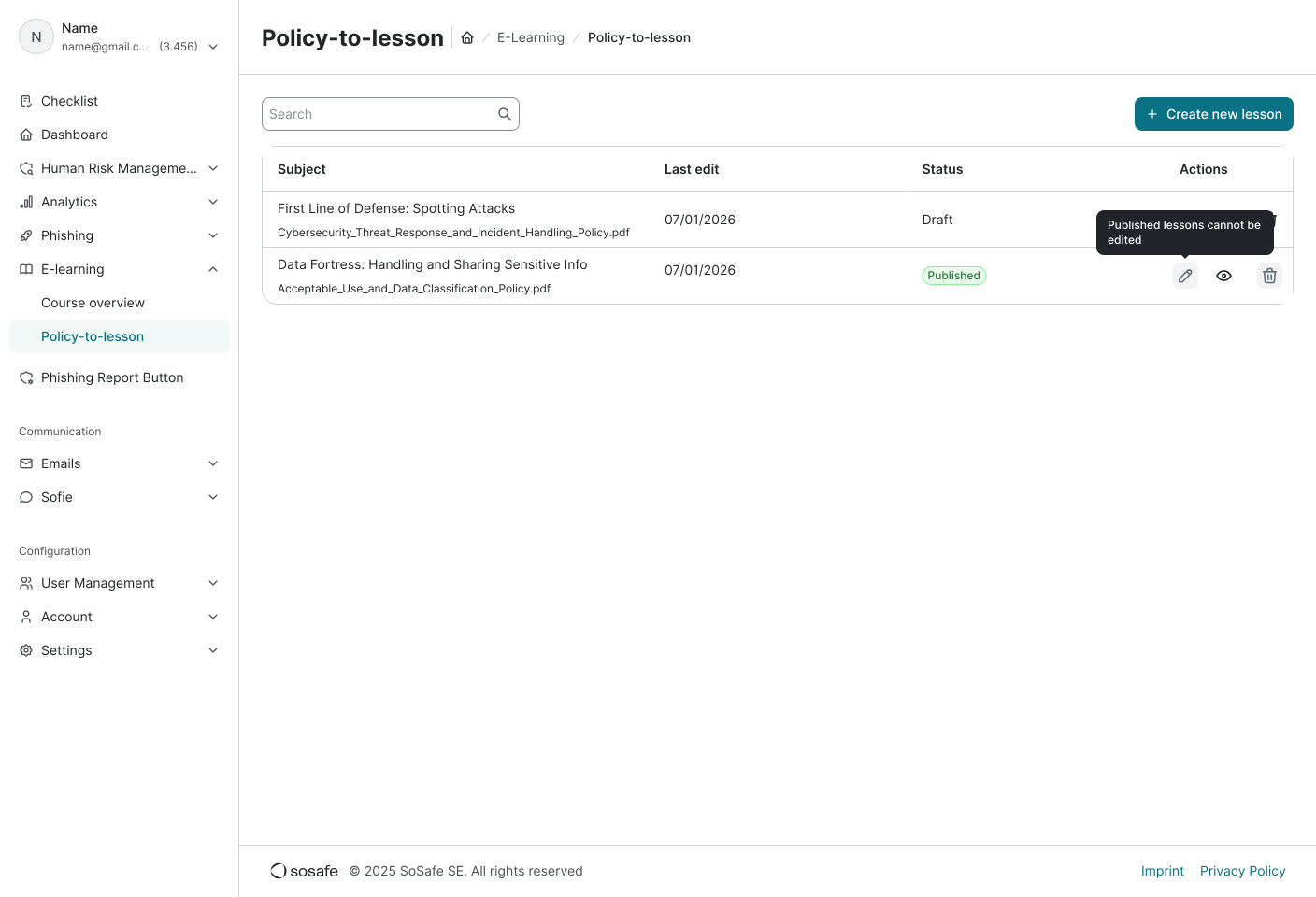
Policy-to-Lesson now supports draft mode, content can be created, edited, or reviewed across multiple sessions, with progress saved automatically each time you click on ‘next page’, allowing you to step away and continue later or hand the lesson over to a colleague for review. Lesson generation also runs in the background, so there’s no need to sit and wait on the page, navigate to other SoSafe Manager pages and come back once it’s ready. That makes it easier for Security, Compliance, HR, Legal, and other stakeholders to contribute before training goes live, without having to coordinate one uninterrupted working session.
Segment your E-Learning reporting, simulation or not
E-Learning-only customers can now segment reporting using their own user groups and attributes, such as department, role, or region, without needing an active phishing simulation. That means less time rebuilding reports manually in spreadsheets and a faster route to the answers stakeholders actually ask for, whether you’re preparing a compliance update, comparing participation across teams, or identifying where additional training attention may be needed.
Manage SSO setup and migration independently
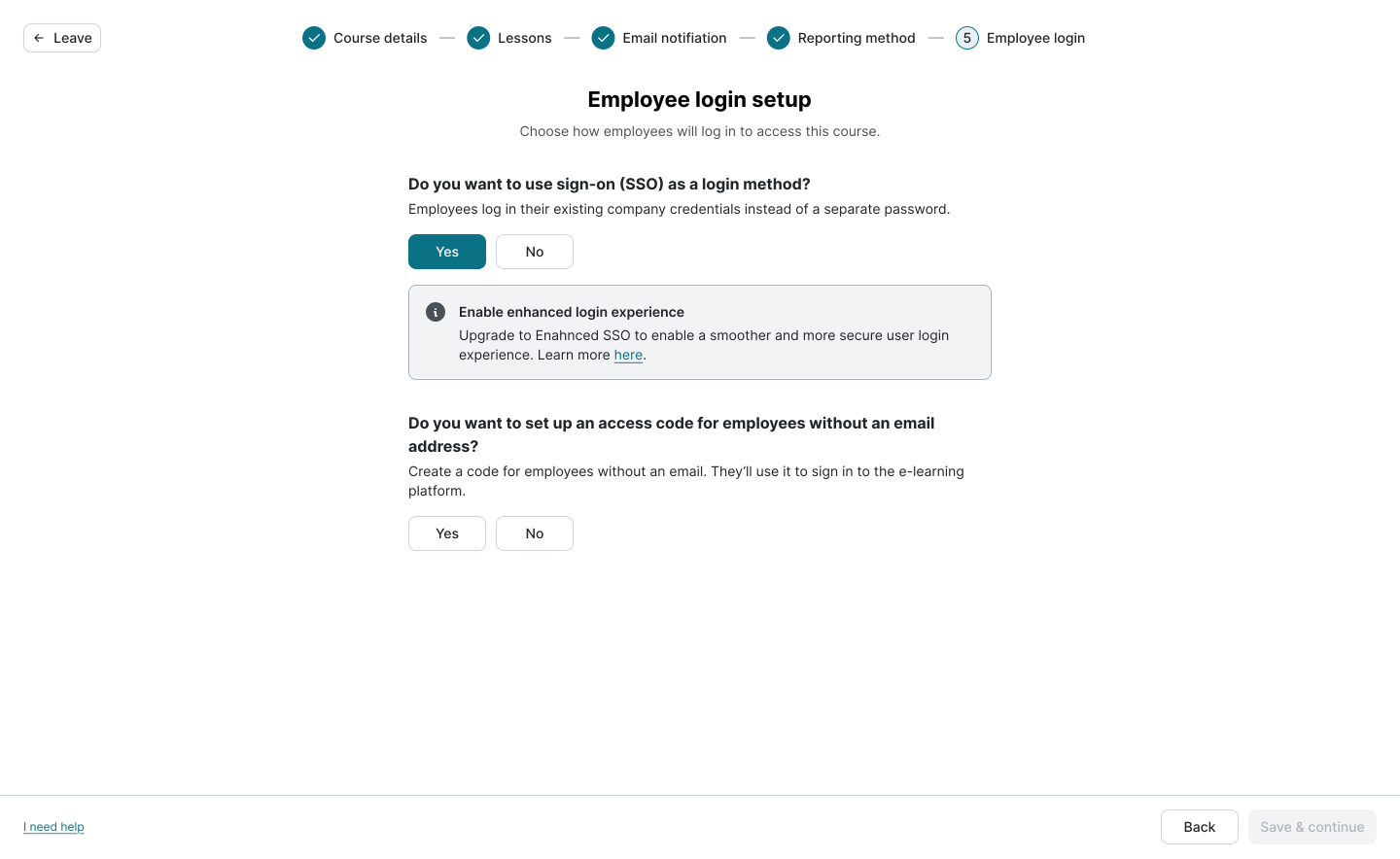
Routine access changes shouldn’t create unnecessary dependencies. Customers using legacy SSO can now move to Auth0 Enterprise SSO through a guided self-service migration flow, giving admins more control over when the transition happens.
SSO can also be enabled for individual E-Learning campaigns directly during campaign setup, even when it isn’t enabled across the entire account. That gives admins more flexibility to match authentication requirements to individual training initiatives.
Exports that match what you filtered for
Data exports now respect the date range applied, and file names reflect the selected range too, so the file you download matches the data you intended to analyse, reducing the need to double-check, filter, or clean up datasets before sharing them with stakeholders.
Let large exports run in the background
For the reports that are too large to sit and wait for, larger exports now run in the background, freeing up time that used to go into watching a report generate. An in-app notification arrives when the export starts, an email lands once it’s ready, and the file sits waiting in a new “Exports” section for retrieval whenever it’s convenient.
Faster, safer threat triage
Building and reporting on training is one side of the job. Responding to what’s actually landing in employees’ inboxes is the other, and it’s the side where minutes matter most. Reviewing reported emails is one of the most frequent and time-sensitive tasks a security team handles, and it’s an area where small efficiencies compound fast across a busy queue. This month’s Threat Inbox updates make that review process faster and safer, at the same time.
See the email, not the code
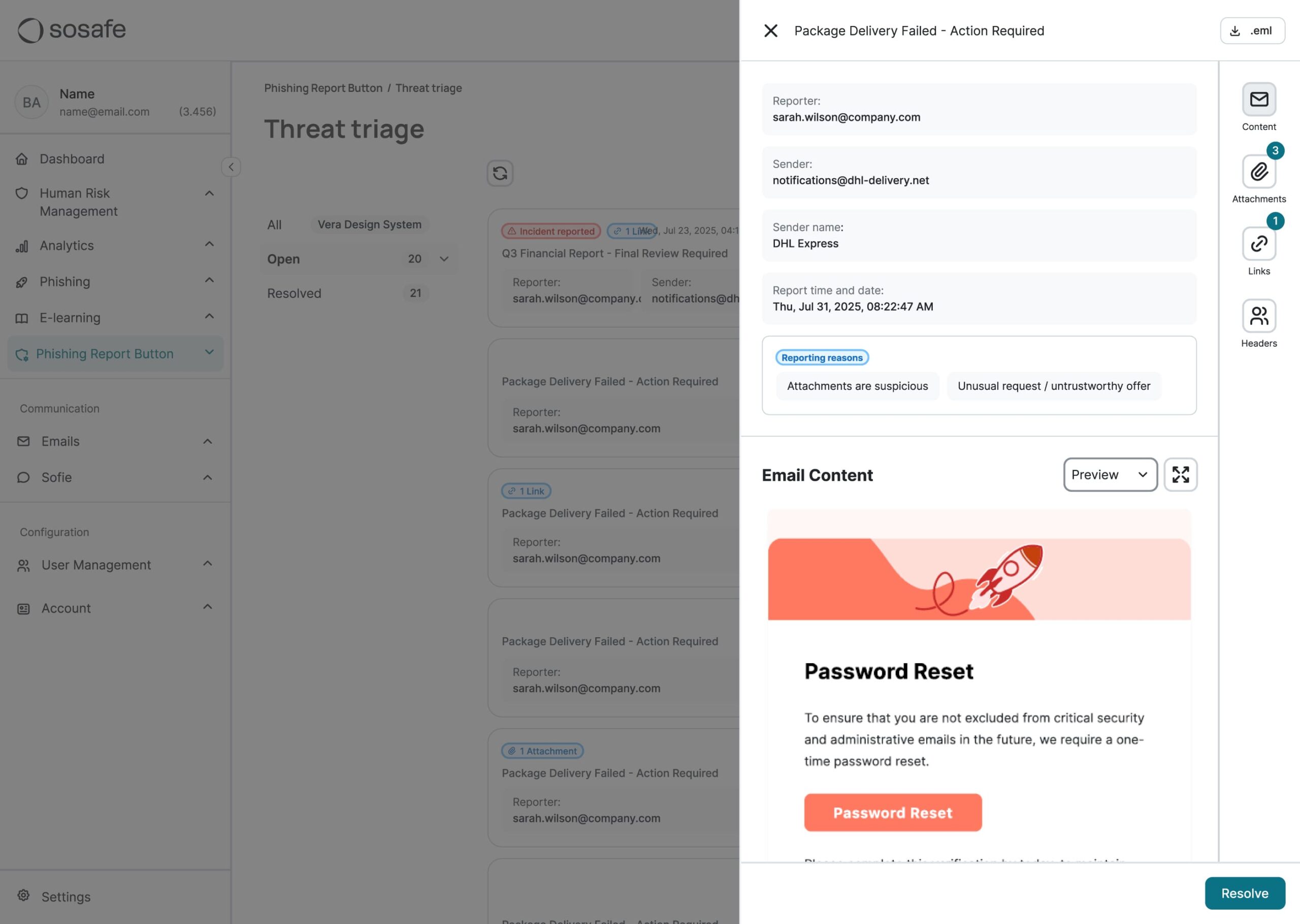
Reported emails now display with their original formatting, colors, and layout intact, instead of inspecting a raw HTML within Threat Inbox. Seeing the email as the employee saw it makes it easier to understand the context of a report and assess whether something looks suspicious, helping teams move through their investigation queue more efficiently.
Review safely by design
The Threat Inbox view is fully sandboxed. External images are blocked and links are not clickable by default, so nothing in the email, including tracking pixels or malicious links, can be triggered during investigation. That means security teams get the visual context they need to assess an email without introducing unnecessary risk into the review process.
Walk into your next audit with documented evidence
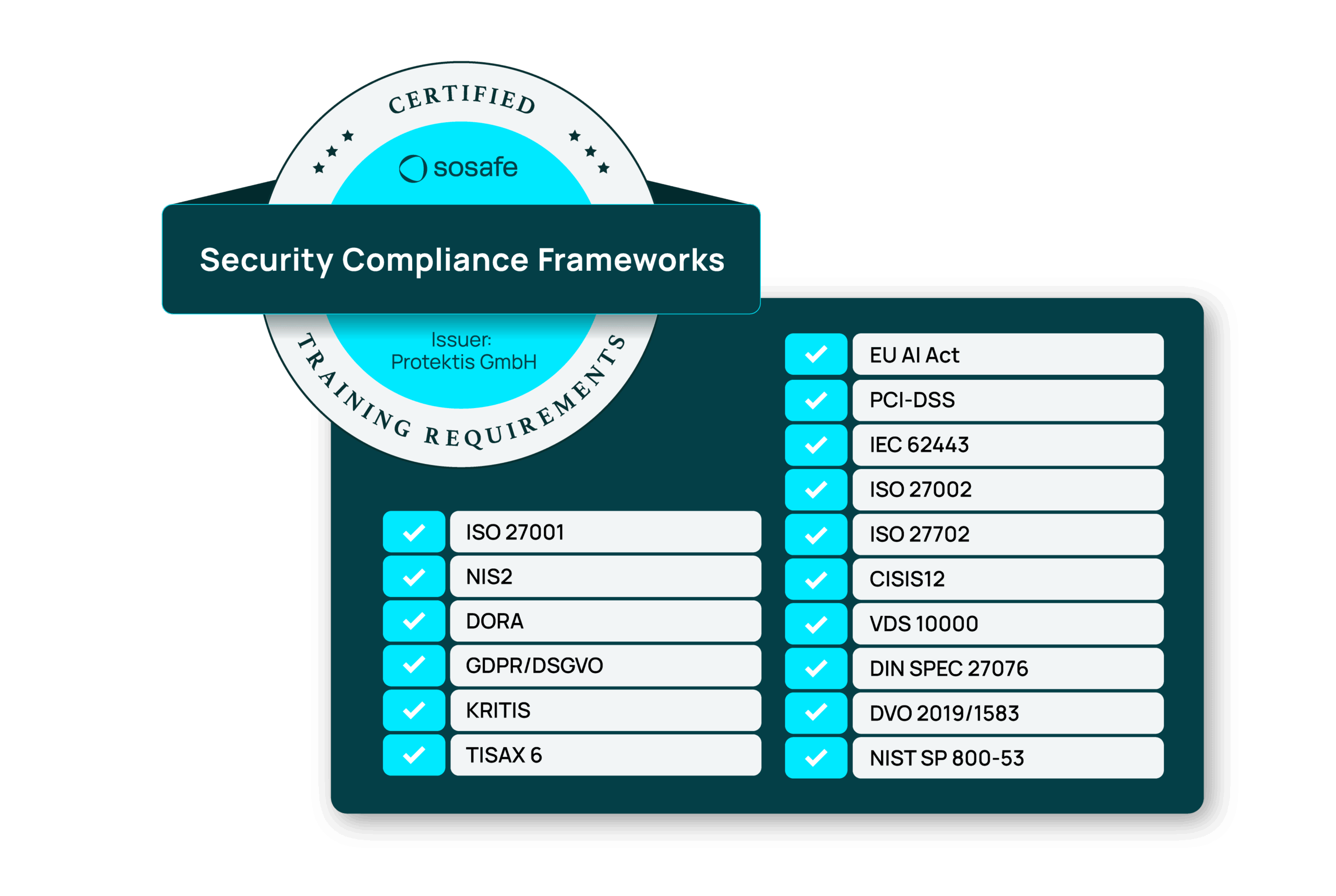
For security and compliance leaders, delivering training is only part of the job. You also need to demonstrate why your programme supports the requirements your organisation is expected to meet. Our training content is regularly assessed by our independent compliance partner, Protektis. The latest review, completed in June 2026, expanded this testing to include the EU AI Act alongside existing regulatory and compliance requirements.
This gives teams additional documented evidence to support audit preparation, internal compliance reviews, and conversations with stakeholders about how security awareness training contributes to regulatory obligations.
As always, organisations remain responsible for determining which regulations apply to them and selecting the training required for their specific industry, workforce, and audit requirements.
A few smaller improvements
More accurate benchmarks as data volume grows
As the amount of underlying benchmark data increases, calculations are periodically refreshed to improve their accuracy. You may therefore notice small changes in benchmark figures over time. These adjustments help ensure comparisons continue to reflect the strongest available dataset as it grows.
Help learners resolve login and registration issues faster
E-Learning login and registration error messages now provide clearer guidance, pointing learners to their internal IT or Cybersecurity team where relevant, or to our Knowledge Base for self-service support, reducing uncertainty and helping users get back into their training more quickly.
For questions about any of these updates, please contact your SoSafe representative or visit our Knowledge Base.
SoSafe Product News

Do you want to stay ahead of the cyber game?
Sign up for our newsletter to receive the latest cyber security articles, events, and resources. No spam, only content that truly matters.



















 Reports
  Guides
  Blog
Blog  Glossary
  Perks
Perks  Customer stories
  Newsletter signup
  Webinars
  Replays
  Podcast
  All events
  Signal Security Summit
  Danger Lab
 Why SoSafe
  Careers
  News & press
  Contact