
New in April: Upgraded reporting experience, unified workflows and smarter analytics
This April, we are focusing on giving you more confidence in your data and more simplicity in your daily workflows. We know that managing security awareness should feel intuitive, and your metrics should always reflect reality. With our latest updates, we are delivering more accurate behaviour insights, a smoother user management process, and an upgraded reporting tool for your employees.
Here is a look at what is new and what is coming soon.
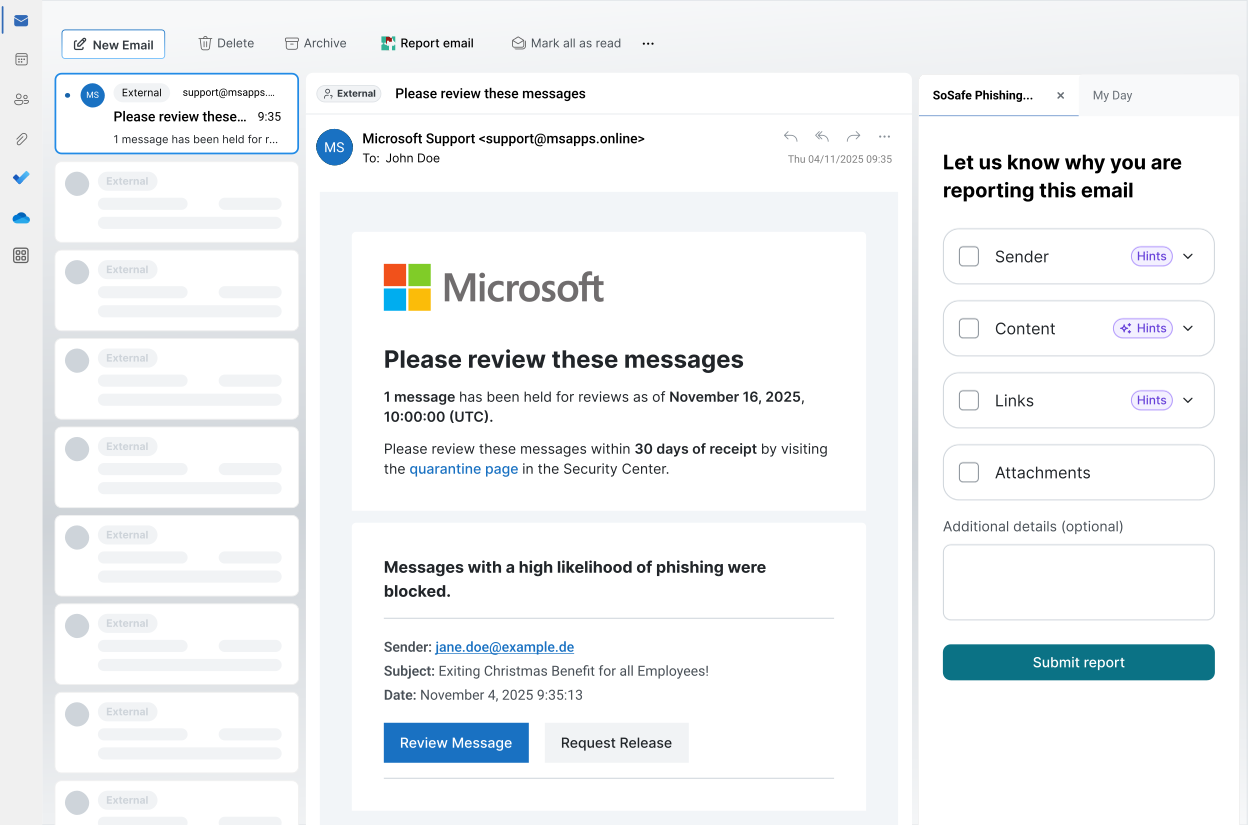
A clearer, streamlined Phishing Report Button for Outlook
On 18 May, we are automatically upgrading the Phishing Report Button in Outlook. We have redesigned this experience to make reporting suspicious emails faster, clearer, and less stressful for your team while giving you better signals from every report.
Here is what to expect from the upcoming rollout:
- Hints replace reporting nudges: Instead of flagging emails as risky, new hints for senders, links, and attachments guide users through the key elements of a message. This helps them build the habit of looking closely before they react.
- AI hints replace Sofie: Our previous chatbot experience has evolved into a seamless, integrated tool that analyses the sentiment and tone of an email. This helps your employees make confident reporting decisions directly within the reporting flow.
- Integrated incident reporting: Reporting a suspicious interaction is now built straight into the main flow, removing extra steps and any second-guessing.
- A focused, clutter-free design: We have removed unnecessary steps like the shortcut mode, the feedback button, and the intro screen. Every click now adds value.
- Broad accessibility: The new button, including all AI hints, is fully supported in 34 languages.
The rollout is completely automatic, and all your existing settings will carry over seamlessly.
Get ready for the upgrade
We recommend giving your employees a short heads-up before 18 May. A quick note goes a long way in helping people feel comfortable with a new workflow, especially one that keeps your organisation secure. Reach out to your SoSafe contact for communication drafts.
A unified, modern upload experience in Manager
We want your administrative tasks to be as smooth as possible. To create a more unified experience, we have streamlined our manual user upload process. The spreadsheet upload in your regular Manager flow now shares the exact same modern design as our self-service onboarding. This gives you one clean, consistent, and familiar experience, whether you are first implementing the platform or updating your information with a wave of new joiners.
Cleaner, more accurate data with trusted clicks
Accurate data is the foundation of a strong security culture. However, automated security scanners often click links in simulation emails, which can artificially inflate your click rates. Previously, you had to work around this issue using local settings.To solve this problem, our phishing simulation analytics now automatically filter out automated bot clicks. This means your dashboard will show you the true picture of real employee behaviour, completely free from automated scanner noise.
This feature has been live for all simulation data since 4 March, and your archived data remains completely unaffected.
Log in to your dashboard today to explore all changes.
SoSafe Product News

Do you want to stay ahead of the cyber game?
Sign up for our newsletter to receive the latest cyber security articles, events, and resources. No spam, only content that truly matters.


















 Reports
  Guides
  Blog
Blog  Glossary
  Perks
Perks  Customer stories
  Webinars
  Replays
  Podcast
  All events
  Signal Security Summit
  Danger Lab
 Careers
  News & press
  Contact