
What’s New: Meet the New AI-Powered Threat Triage
This month’s updates help you act on reported threats faster, give employees a safe place to practise spotting phishing and make policy training more relevant to your organisation. You’ll also get clearer data to guide learning follow-up, video lessons in more languages and more control over everyday campaign management.
What’s new
- Assess and act on reported emails faster with AI-powered Threat Inbox
- Help employees practise spotting phishing with a new interactive lesson
- Make policy training more relevant with custom images in Policy-to-Lesson
- See who needs support with richer Learning data and standardised exports
- Reach more employees with video lessons dubbed in Czech, Hungarian, Croatian, Slovenian and Slovak
- Choose a 30-, 60- or 90-day lesson lock window
- Delete E-Learning campaigns you no longer need
Turn employee reports into faster threat response
Every reported email is a signal worth acting on. But when reports pile up after a phishing wave, working through them one by one takes time most teams don’t have, and malicious emails can sit untouched in inboxes while they wait.
Switch on AI Analysis within Threat Inbox to help your team assess what needs attention. It classifies reports as Safe, Spam or Malicious with a plain-language explanation, supporting your admins’ decisions. Filter by classification, find relevant reports with search and resolve similar reports together to work through the queue faster.
With a connected mailbox, admins can move reported emails to the original mailbox’s Spam or Trash folder. Google Workspace also supports blocking senders or domains, helping your team act on threats directly from Threat Inbox, and employees who report them hear back faster.
Full report history keeps past decisions easy to revisit, and the refreshed interface is now available in English, German and French.
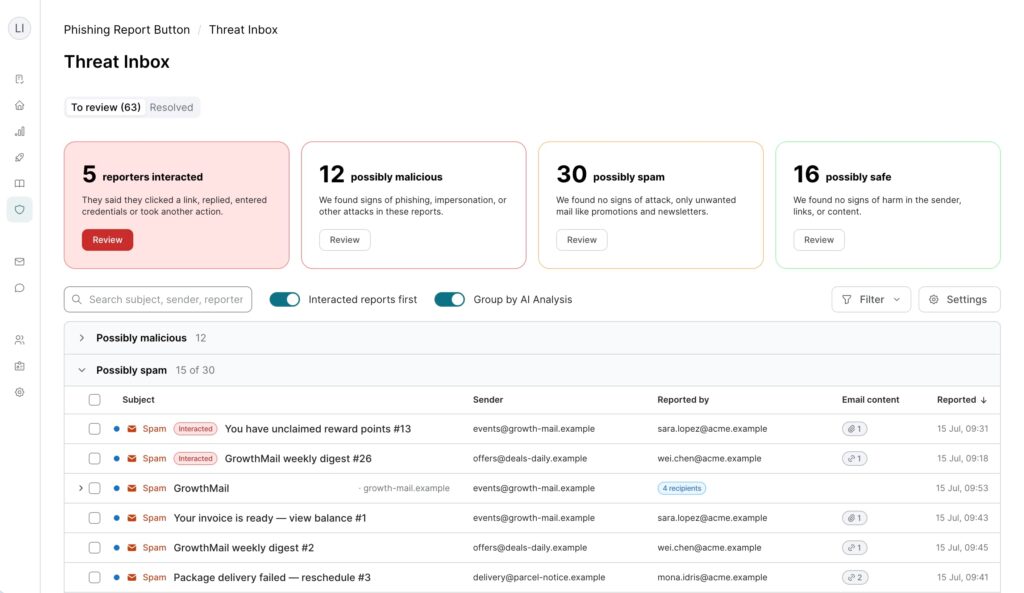
The AI analysis is optional and stays off until you switch it on. Available on Premium and Advanced plans and above.
Give employees a safe inbox to practise spotting phishing
Knowing the warning signs of a phishing email is one thing. Spotting them in the moment, when a message feels urgent or appears to come from a familiar name, is another.
Our new interactive phishing lesson puts a role-based phishing email in front of them in a safe inbox, where a wrong click has no consequences. Practise recognising urgency, pressure, and deception in the moment. It complements phishing simulations, the lesson is where employees rehearse, and simulations show whether it has stuck.
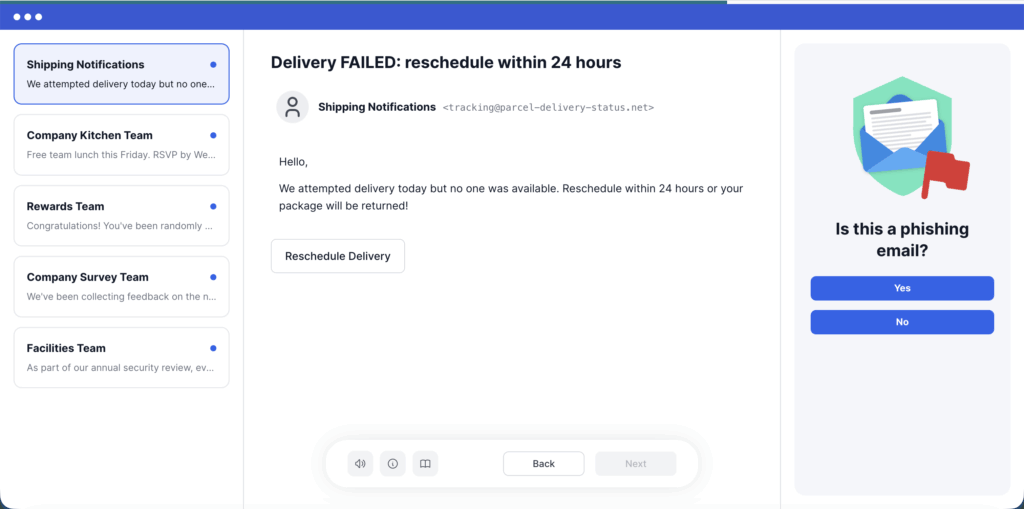
Available on Premium and Advanced plans.
Make policies easier to follow and demonstrate in audits
Help employees understand how to put your guidance into practice. Add your own photos, screenshots or diagrams to Policy-to-Lesson to make instructions clearer and connect them to real situations. Training that reflects your organisation’s procedures also helps you demonstrate that connection during audits.
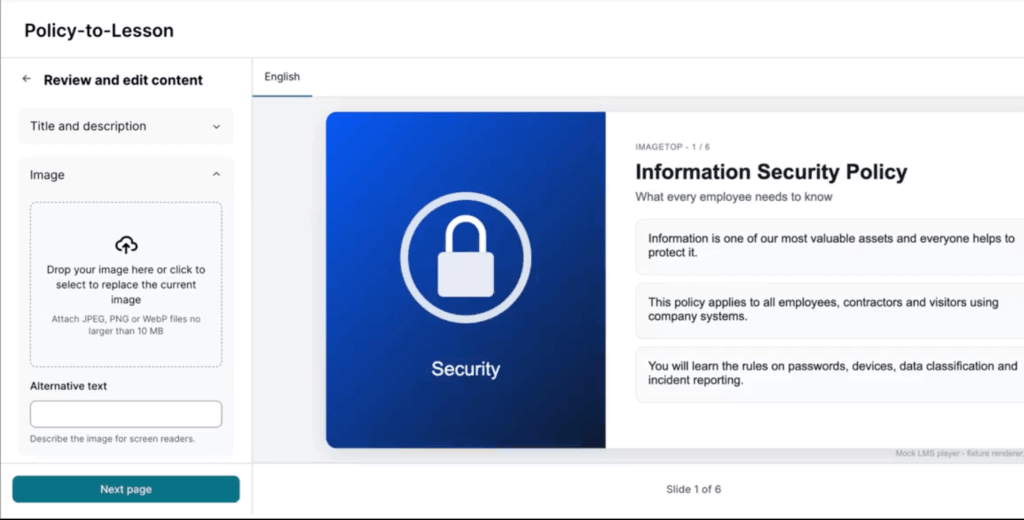
Available on Premium and Advanced plans.
Spot who needs learning support with clearer exports
The Learning export now shows each learner’s status, days overdue, outstanding mandatory modules, next due date and the responsible person’s contact details, so you can see exactly who is behind and who should follow up.
Learning and Simulation exports also now share one standardised format across Excel and CSV, making files easier to read and audit. If a report or automation relies on the old layout, you can switch back from the export page until 11 January 2027. Public API, Power BI and OneDrive integrations are unaffected.
Reach more employees in their own language
Video lessons in our new learning experience are now fully dubbed in Czech, Hungarian, Croatian, Slovenian and Slovak, with matching subtitles and transcripts. Employees in these countries no longer read along to English audio, and teams held back by English-only video can now move to the new lessons.
Run learning campaigns around your organisation’s needs
Not every organisation works to the same training calendar. Some need shorter learning cycles, others plan further ahead. And as programmes evolve, old campaigns should not get in the way of the ones that are running.
Two updates give you more flexibility:
- Keep learning focused on the next deadline. Choose a 30-, 60- or 90-day lesson lock window so employees only see modules due within the timeframe you set, whether you’re running shorter cycles or planning further ahead.
- Keep your campaign overview relevant. Remove outdated or test campaigns, without opening a support ticket. If a campaign is deleted by mistake, your Customer Success Manager can restore its visibility.
To learn more about what’s available for your organisation, contact your SoSafe representative or visit our Knowledge Base.
SoSafe Product News


Do you want to stay ahead of the cyber game?
Sign up for our newsletter to receive the latest cyber security articles, events, and resources. No spam, only content that truly matters.











 Reports
 Guides
 Blog
 Glossary
 Perks
 Customer stories
 Webinars
 Replays
 Podcast
 All events
 Signal Security Summit
 Danger Lab

 Careers
 News & press
 Contact
